
My Account

Digital Planner Templates: Your Secret Weapon for an Organized

Forget the frantic search for a pen and the frustration of messy, unchangeable paper layouts. The right set of digital planner templates offers a dynamic, beautiful, and deeply personal way to manage your time, goals, and dreams. These templates are more than just digital files; they are customizable frameworks designed to bring clarity and intention to every aspect of your day, week, and year. Whether you’re a creative entrepreneur mapping out a launch or someone seeking more balance, digital planner templates provide the structure you need with the flexibility you crave.

The evolution of digital planner templates has been remarkable, moving from simple PDFs to interactive, hyperlinked systems that work seamlessly on iPads, tablets, and computers. In 2026, the options are more sophisticated and user-friendly than ever, integrating with the apps and workflows we use daily. This guide will walk you through everything from the core benefits to advanced customization, helping you find and use digital planner templates that feel like they were made just for you.

What Are Digital Planner Templates, Really?

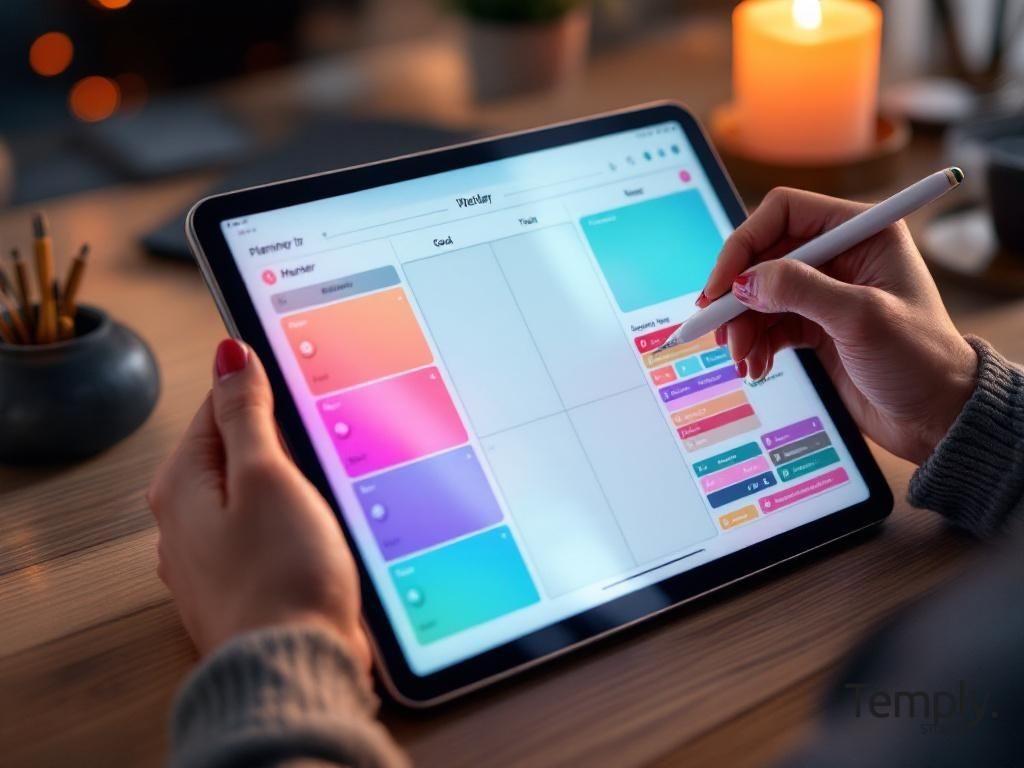
At their core, digital planner templates are pre-designed page layouts that you use within a note-taking or design app on a digital device. Think of them as the architectural blueprint for your planning system. Instead of starting from a blank screen, you begin with a professionally designed structure that includes calendars, habit trackers, project dashboards, and more. You then populate this structure with your own information, often using a stylus to write, type, or drag-and-drop elements into place.

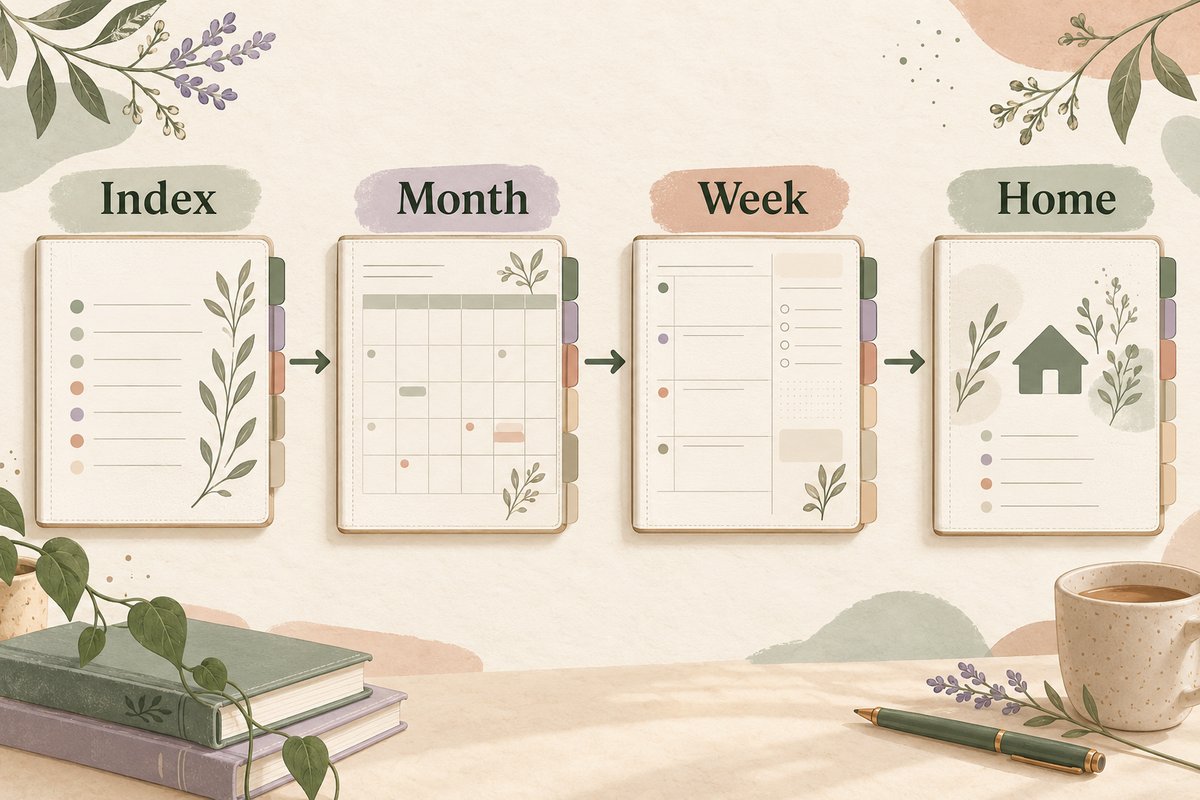
The magic of digital planner templates lies in their reusability and adaptability. Unlike a physical planner you buy each year, a single digital planner template purchase can last a lifetime. You can duplicate pages infinitely, erase and rewrite without a trace, and often copy the entire template to use again next year. This makes them an incredibly sustainable and cost-effective choice. The best templates are designed with user experience in mind, featuring intuitive navigation tabs, clickable links between related pages (like from a monthly calendar to a specific weekly spread), and layers that allow for easy customization.

digital planner templates

The Technical Foundation: File Formats and Apps

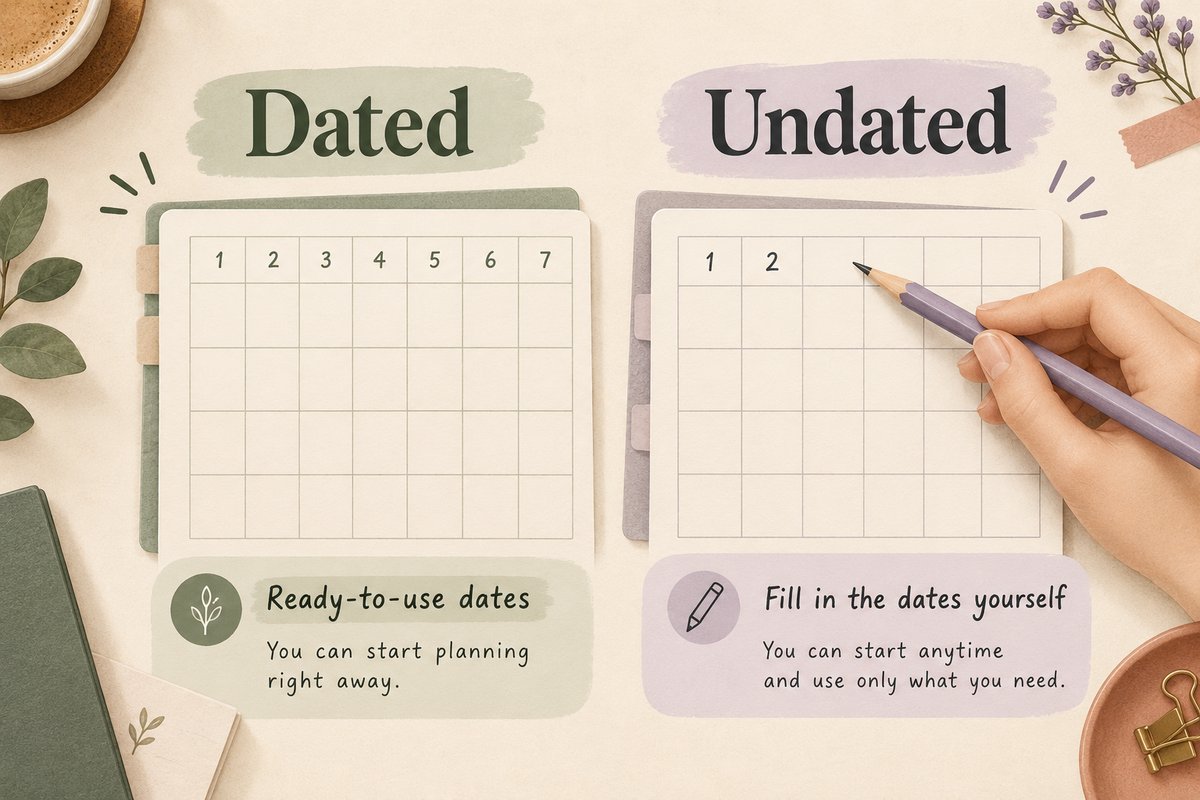
Understanding the common file formats is key to choosing the right digital planner templates for your setup. The most popular format is the PDF, specifically a PDF with embedded hyperlinks. These hyperlinks turn the static document into an interactive experience; you can tap a date on an index page and instantly jump to that month’s calendar. These PDFs are used in apps like GoodNotes, Notability, Noteshelf, and even some PDF readers on desktop computers.

Another major category is native app templates. For instance, digital planner templates designed specifically for Notion are built within the Notion platform itself. You duplicate a shared page, and it becomes a fully functional database-driven planner in your own workspace. Similarly, Canva offers a vast marketplace of planner templates that you can edit directly within their graphic design tool, perfect for those who prefer a more visual, drag-and-drop approach. Each format has its strengths: PDFs offer a familiar, notebook-like writing feel with a stylus, while app-native templates provide powerful database functionalities and easier cross-device syncing.

The choice of app often dictates the type of template you need. If you love the tactile feel of handwriting, a PDF template used in GoodNotes is likely your best bet. If you need to collaborate with a team or automate certain tasks, a Notion template might be more powerful. Many planners now also offer bundles that include multiple formats—a PDF for annotation and a Canva file for quick visual edits—giving you the ultimate flexibility. When shopping for digital planner templates, always check the compatible formats and required apps to ensure they fit seamlessly into your existing digital ecosystem.

The Undeniable Benefits of Using Digital Planner Templates

Switching to a digital planning system powered by well-designed templates isn’t just a tech upgrade; it’s a lifestyle shift that compounds positive effects over time. The benefits extend far beyond simple organization, touching on mental clarity, financial savings, and creative expression. For the busy professional, student, or parent, these advantages can be truly transformative, turning planning from a chore into a rewarding ritual.

One of the most immediate benefits is the sheer reduction of physical clutter. No more shelves weighed down by old journals, no more drawers full of half-used notebooks. Your entire planning history—years of goals, reflections, and schedules—can reside neatly on your device or in the cloud. This portability is another huge win. Your planner, with all its templates and notes, is always with you on your phone or tablet, ready for a quick check-in during your commute or a planning session at a café. You’ll never be caught without your crucial information again.

1. Unlimited Customization and Flexibility

This is where digital planner templates truly shine. With a paper planner, you’re stuck with the layout the publisher chose. If you need more space for meal planning one week and less for appointments, you’re out of luck. Digital templates erase this limitation. You can easily duplicate a daily page if you have an extra-busy day, or skip a section entirely if it doesn’t serve you. Most apps allow you to add blank pages anywhere, insert images, stickers, and different paper styles.

For example, you might start with a core digital planner template bundle from Temply Studio that includes a financial tracker. One month, you decide to do a “no-spend challenge.” You can duplicate that financial page multiple times, creating a dedicated section just for that challenge without disrupting the rest of your planner’s flow. The next month, you can hide those pages or archive them. This level of adaptability means your planner evolves with your changing goals and priorities, something a static book simply cannot do.

The aesthetic customization is equally powerful. Don’t like the default color scheme of your digital planner templates? In apps like GoodNotes or Canva, you can change the background paper, the color of your pen strokes, or even import entirely new decorative elements. This allows you to create a planner that not only functions perfectly for your needs but also brings you joy every time you open it. A beautiful, personalized workspace can significantly increase your motivation to engage with your plans consistently.

2. Cost-Effectiveness and Sustainability

2026 Wellness Journal | Digital Self Care Planner | Gratitude & Habit Tracker | Goodnotes Mental Health Diary | Mindfulness
✦ Featured at Temply Studio
2026 Wellness Journal | Digital Self Care Planner | Gratitude & Habit Tracker | Goodnotes Mental Health Diary | Mindfulness
Transform your wellness journey in 2026 with this beautifully designed Digital Wellness Journal, created to help you nurture...
View Product →

Let’s talk numbers. A high-quality physical planner can easily cost $30-$60 each year. Over a decade, that’s a significant investment, not to mention the environmental cost of production and shipping. A premium set of digital planner templates, in contrast, is often a one-time purchase between $15 and $40. Once you own it, you can use it year after year. You’re not just buying a product for 2026; you’re investing in a system for the foreseeable future.

The sustainable angle is compelling. By going digital, you eliminate paper waste, reduce your carbon footprint associated with manufacturing and transportation, and declutter your physical space. Many creators of digital planner templates, including Temply Studio, are mindful of this, offering timeless designs that won’t feel dated so you can reuse them indefinitely. This approach aligns with a more intentional, minimalist lifestyle, where you own fewer things but make sure the things you do own—digital or otherwise—are of high quality and serve you well for a long time.

Furthermore, the value often extends beyond the initial template. Many bundles include bonus content—sticker packs, dashboard widgets, or specialized trackers—that you can mix and match. This “digital asset” mindset means your initial purchase continues to grow in utility. You can build a library of templates for different purposes: one for business projects, one for personal wellness, and one for family management, all for less than the cost of two years’ worth of physical planners.

3. Enhanced Productivity with Integrated Tools

Digital planner templates bridge the gap between analog planning and digital productivity. They allow you to harness the best of both worlds: the focus and cognitive benefits of writing by hand (with a stylus) and the powerful features of digital technology. Need to set a reminder for a task you just jotted down? You can often link your handwritten note to your device’s native calendar app. Jotted down a book title? A quick copy and paste can send it to your Amazon wishlist or library app.

Advanced templates incorporate productivity methodologies directly into their design. You might find templates built around the Getting Things Done (GTD) system, with dedicated sections for “Inboxes,” “Next Actions,” and “Project Support Materials.” Others might be designed for the Eisenhower Matrix to help prioritize tasks by urgency and importance. By using a template that already embodies these systems, you remove the friction of setting it up yourself and can immediately start working within a proven framework.

The integration with other digital tools is a massive time-saver. Imagine a project management digital planner template in Notion. You can have a master project dashboard that automatically pulls in deadlines from your calendar, displays progress bars based on completed tasks in a linked database, and even shows relevant files from Google Drive. This creates a single source of truth for your work, eliminating the need to switch between ten different apps to get the full picture. The template provides the structure, and the integrations provide the dynamic, live data.

How to Choose the Perfect Digital Planner Templates for You

With thousands of digital planner templates available online, the choice can feel overwhelming. The key is to move beyond what looks pretty and focus on what will functionally support your unique life and workflow. A template that works brilliantly for a social media manager might be a poor fit for a PhD student. Your selection process should be intentional, starting with a clear audit of your own needs and habits before you even browse a store.

Begin by asking yourself some foundational questions. What is the primary pain point you’re trying to solve? Is it time management, goal setting, habit building, or project tracking? How do you prefer to interact with information—by writing, typing, or a mix of both? What device will you use most (iPad, Android tablet, laptop)? What apps are you already committed to or willing to learn? The answers to these questions will immediately narrow your search from “all templates” to “templates that work with GoodNotes on an iPad for goal setting,” for example.

digital planner templates

Auditing Your Planning Personality

Are you a detailed, time-blocking enthusiast who needs to account for every 15-minute interval? Or are you a big-picture thinker who needs ample space for brainstorming and mind-mapping before breaking things down into tasks? Your planning personality should dictate the layout density of your digital planner templates. Time-blockers will thrive with weekly or daily spreads that have clear, segmented hourly timelines. Big-picture thinkers might prefer a template that starts with a visionary “Year at a Glance” page, then quarterly goal maps, then monthly summaries, with dailies being more free-form.

Consider your tracking needs. Some people find immense motivation in tracking habits, moods, water intake, or finances. If this is you, prioritize templates that include—or have space to add—these trackers in a logical, easy-to-update format. Others find excessive tracking burdensome. If that sounds familiar, look for cleaner, more open layouts that focus on priorities and to-dos without compulsory checkboxes for every little thing. The goal is to choose a template that feels supportive, not suffocating.

Don’t forget aesthetics, but put them in their proper place. A beautiful template can inspire you to use it, but if the layout is illogical for your brain, you’ll eventually abandon it. Look for a design that is visually clear and legible first. Are the fonts easy to read? Is there enough contrast between text and background? Is the color scheme calming or energizing, based on what you need? A well-designed digital planner template from a brand like Temply Studio balances form and function, using color and typography to guide your eye to the most important information without causing distraction.

Key Features to Look For in a Quality Template

2026 Wellness Journal | Digital Self Care Planner | Gratitude & Habit Tracker | Goodnotes Mental Health Diary | Mindfulness
✦ Featured at Temply Studio
2026 Wellness Journal | Digital Self Care Planner | Gratitude & Habit Tracker | Goodnotes Mental Health Diary | Mindfulness
Transform your wellness journey in 2026 with this beautifully designed Digital Wellness Journal, created to help you nurture...
View Product →

Not all digital planner templates are created equal. Here are the hallmarks of a high-quality, professional template that will provide a smooth user experience. First, hyperlinked navigation is non-negotiable for PDF planners. A clickable index, tabs along the side or bottom of the page, and links from monthly calendars to the corresponding weekly spreads are essential for efficiency. Testing a demo file, if available, is the best way to check this.

Second, look for layered source files if you plan to do any customization in design software. A Canva template or Adobe Illustrator file with layers allows you to turn elements on or off, change colors globally, and truly make the template your own. Third, check for duplicate-able pages. The template should include master copies of key pages (like daily, weekly, or project sheets) that you can easily duplicate as many times as you need, rather than being locked into a pre-set number.

Finally, consider the community and support around the template. Does the creator provide tutorial videos or a guide on how to use the template effectively? Is there a community of users you can learn from? A great template is often part of a larger system, and having access to that knowledge can dramatically shorten your learning curve and help you get more value from your purchase. Investing in a template from a reputable source ensures you’re getting a product that has been thoughtfully tested and refined.

A Deep Dive into Different Types of Digital Planner Templates

The world of digital planner templates is wonderfully diverse, catering to nearly every niche and need imaginable. Understanding the main categories can help you identify which type will serve as the cornerstone of your system. Some people use one comprehensive “life” planner, while others prefer a collection of specialized templates for different roles they play. Let’s explore the most popular and effective types available in 2026.

General life planners are the jack-of-all-trades, typically structured around a classic dated format (yearly, monthly, weekly, daily). They include sections for goals, notes, and sometimes basic trackers. Their strength is versatility; they can be adapted for personal or light professional use. However, their weakness can be a lack of depth in any one area. For someone with complex project needs or specific tracking goals, a specialized template is often a better starting point, as it provides a framework designed by experts in that particular field.

Productivity & Business Planner Templates

These digital planner templates are engineered for output and growth. They go beyond simple task lists to incorporate strategic business functions. A robust business planner might include sections for: a Yearly/Quarterly Goal Map tied to key performance indicators (KPIs); a Monthly Profit & Loss Tracker with formulas built-in (in apps like Notion or Excel); Content Calendars with slots for topics, platforms, and status; Client Management pages for notes, follow-ups, and invoices; and Project Briefs with scope, deliverables, and timelines.

For entrepreneurs and freelancers, these templates act as a lightweight CRM and business dashboard. The visual layout helps you see the health of your business at a glance. For example, a weekly spread in a business planner might dedicate space for top priorities, scheduled deep work blocks, client calls, and a small area to log daily income and expenses. This integrates action with reflection, helping you make data-driven decisions about where to focus your energy. Using a professionally designed business template can save hours of setup time and provide a structure you might not have conceived of on your own.

Many productivity templates also focus on personal effectiveness. These might include Eisenhower Matrix pages to categorize tasks by urgency/importance, Time Audit logs to discover where your hours really go, and Energy Level Trackers to schedule demanding work during your peak times. The best productivity digital planner templates teach you a method while giving you the tool to implement it, creating a positive feedback loop of planning and execution.

Wellness & Self-Care Planner Templates

This category of digital planner templates is dedicated to nurturing your physical and mental health. In an always-on world, a structured space for self-reflection and care is not a luxury; it’s a necessity for sustained performance. Wellness planners often feature undated or gently guided pages that encourage mindfulness rather than productivity pressure.

Common elements include: Mood & Emotion Trackers to identify patterns and triggers; Gratitude Logs to cultivate a positive mindset; Sleep & Hydration Charts; Meal Planning & Recipe sections with space for photos; Exercise Routines with progress tracking; and Habit Builders for routines like meditation or reading. Some advanced templates incorporate guided journaling prompts for morning pages, evening reflections, or weekly reviews focused on energy and satisfaction rather than just completed tasks.

The digital format is particularly powerful for wellness because it’s private and portable. You can be honest in your mood tracking without fear of someone else seeing a physical journal. You can also easily add photos of your meals or a screenshot of a workout summary from your fitness app. The act of checking in with a wellness template creates a daily ritual of self-acknowledgment, which can significantly improve overall well-being and prevent burnout. It’s a powerful companion to any productivity-focused system, ensuring you’re planning for sustainability, not just output.

Mastering Your Digital Planner: Setup and Workflow Integration

Buying a beautiful set of digital planner templates is just the first step. The real magic happens when you integrate them into a sustainable daily workflow. A planner that sits unused is just a digital artifact. The goal is to create a system so intuitive and helpful that it becomes a natural extension of your thought process. This requires an intentional setup phase and the development of simple, repeatable habits.

Start by dedicating time to import and explore your new template. Don’t try to launch it on a chaotic Monday morning. Choose a quieter time, perhaps on a weekend, to open the file in your chosen app. Tap every link to understand the navigation. Duplicate a few pages to practice. Customize the basics: set up your pen colors and thicknesses in your note-taking app, or adjust the color palette in a Canva template to suit your taste. This initial “play” period reduces friction later and builds familiarity.

Creating a Sustainable Daily and Weekly Ritual

2026 Wellness Journal | Digital Self Care Planner | Gratitude & Habit Tracker | Goodnotes Mental Health Diary | Mindfulness
✦ Featured at Temply Studio
2026 Wellness Journal | Digital Self Care Planner | Gratitude & Habit Tracker | Goodnotes Mental Health Diary | Mindfulness
Transform your wellness journey in 2026 with this beautifully designed Digital Wellness Journal, created to help you nurture...
View Product →

Consistency is more important than perfection. Establish a short daily ritual—5 to 10 minutes—to interact with your digital planner templates. For many, this works best in the morning. Open your planner, review today’s page (or create it by duplicating your daily template), and jot down your 1-3 Most Important Tasks (MITs). Time-block your schedule if that’s your method. The key is to make this a non-negotiable touchpoint, like brushing your teeth.

The weekly review is the cornerstone of any effective planning system. Set a recurring appointment with yourself for 30-60 minutes, perhaps on a Friday afternoon or Sunday evening. During this review, you’ll use your template’s structure to: look back at the past week’s accomplishments and reflections; clear out any unfinished tasks by migrating, deleting, or scheduling them; review your monthly and quarterly goals to ensure your upcoming week’s tasks are aligned; and finally, plan and populate your weekly spread. This ritual ensures your planner is a living document that guides your actions proactively, rather than just being a reactive log of what happened.

Integrate your planner with your other digital tools. For instance, after your weekly review, you might transfer any time-sensitive appointments from your planner into your Google Calendar to sync with your family or team. Or, you might process notes from a client meeting in your planner by turning them into actionable tasks in a project management app like ClickUp. Your digital planner templates should be the brain of your operation—the place for thinking, prioritizing, and reflecting—while other apps can handle notifications, collaboration, and specialized functions.

Advanced Customization: Making the Template Truly Yours

Once you’re comfortable with the basic workflow, you can elevate your system by deeply customizing your digital planner templates. This is where you move from using a template to owning a system. In apps like GoodNotes, you can create a “sticker book” or “element library” on a blank page. Save frequently used text (like your MIT header), custom checkboxes, or favorite functional stickers (arrows, dividers, icons) here. You can then lasso and copy these elements to any page, speeding up your setup dramatically.

For Notion or Canva templates, customization can be even more powerful. You can add new database properties, create linked views, or design entirely new page types that connect to your master dashboard. For example, if your business planner doesn’t have a specific podcast episode tracker, you can design one in Canva using a similar visual style and import it as a new page type. The goal is to iteratively refine your template based on what you actually use and need, removing friction and adding superpowers over time.

Don’t be afraid to mix and match templates from different sources. You might use a main life planner from one creator but import a brilliant habit tracker page from another. Many shops, including ours at Temply Studio, sell individual page packs or “plug-in” modules for this very purpose. This modular approach lets you build a Frankenstein’s monster of a planner that is perfectly optimized for you—a collection of the best digital planner templates and pages, all working in harmony within your digital notebook.

The Future of Digital Planner Templates in 2026 and Beyond

As we move through 2026, the trajectory for digital planner templates points toward greater intelligence, integration, and interactivity. The line between a static template and a full-fledged application is beginning to blur. We’re seeing templates that don’t just provide structure but also offer gentle guidance, data analysis, and adaptive features based on user input. The future is about planners that work smarter with you, not just for you.

One major trend is the rise of AI-assisted planning features within templates. Imagine a daily page that, based on your scheduled meetings and past task completion rates, suggests an optimal time block for your most important work. Or a weekly review section that uses natural language processing to analyze your reflection notes and highlight recurring themes or potential stressors. These aren’t science fiction; they are beginning to appear in advanced app-native templates, particularly those built on platforms that support API connections and automation.

digital planner templates

Hyper-Integration and Cross-Platform Syncing

The dream of a truly seamless digital ecosystem is getting closer. Future digital planner templates will likely function less as isolated files and more as intelligent interfaces that pull live data from across your digital life. Your financial planner page could connect securely to your bank feeds (with your permission) to auto-populate spending categories. Your fitness tracker could pull data directly from your Apple Health or Fitbit, visualizing trends alongside your logged energy levels and goals.

Cross-platform syncing will become more robust and user-friendly. Writing on your iPad in GoodNotes will instantly reflect on the same page viewed on your iPhone or Mac, with handwriting recognition making your notes searchable everywhere. Template designers will build for this connected reality, creating layouts that present information optimally on different screen sizes and ensuring interactive elements work flawlessly across devices. The planner will become a ubiquitous layer over your digital existence, accessible and editable anywhere.

For creators like Temply Studio, this means designing digital planner templates with these integrations in mind—creating clean data structures in Notion templates that can easily connect to other tools, or providing well-organized, layered design files that tech-savvy users can hook up to their automation platforms like Zapier or Make. The template becomes the beautifully designed “front end” of a powerful, personalized productivity system.

Conclusion: Building Your Intentional Life with the Right Framework

The journey to finding and mastering your ideal digital planner templates is an investment in your own clarity, peace of mind, and effectiveness. It’s about choosing a framework that respects your time and amplifies your intentions. In 2026, the tools available are more powerful and accessible than ever, putting a professional-grade planning system within everyone’s reach. The key is to start with self-awareness, choose quality templates designed for your specific needs, and commit to the simple rituals that make the system work.

Remember, the goal isn’t to have the most elaborate or colorful planner; the goal is to have a planner you actually use—one that helps you move from overwhelm to action, from distraction to focus, and from intention to achievement. A well-chosen template removes the guesswork and provides a proven path forward, whether you’re planning your day, your business quarter, or your personal wellness journey.

If you’re ready to transform your planning, explore the collection of thoughtfully designed digital planner templates at Temply Studio. Our templates are crafted with both beauty and brains, offering the intuitive layouts and smart features that creative entrepreneurs and intentional individuals need to thrive. From undated life planners to specialized business dashboards, find the perfect digital foundation for your most organized year yet. Check out our guide to choosing your first digital planner for more personalized advice.

Frequently Asked Questions (FAQ)

What apps do I need to use digital planner templates?

2026 Wellness Journal | Digital Self Care Planner | Gratitude & Habit Tracker | Goodnotes Mental Health Diary | Mindfulness
✦ Featured at Temply Studio
2026 Wellness Journal | Digital Self Care Planner | Gratitude & Habit Tracker | Goodnotes Mental Health Diary | Mindfulness
Transform your wellness journey in 2026 with this beautifully designed Digital Wellness Journal, created to help you nurture...
View Product →

It depends on the template format. For hyperlinked PDFs, you’ll need a PDF annotation app like GoodNotes (iOS/iPadOS), Notability, Noteshelf, or Xodo (Android/Cross-platform). For Notion templates, you need a Notion account. For Canva templates, you need a free or Pro Canva account. Always check the product description for the required or recommended apps before purchasing your digital planner templates.

Can I use digital planner templates on my computer, or do I need a tablet?

You can use them on both, but the experience differs. On a computer (Windows/Mac), you can view and type into PDF planners using Adobe Acrobat Reader or similar, and you can fully use Notion and Canva. The handwriting experience, however, is best on a tablet with a stylus (like an iPad with Apple Pencil). Many people use a hybrid approach: planning and writing on a tablet, then referencing or adding quick notes on their computer.

Are digital planner templates worth the money compared to free ones?

Premium digital planner templates from reputable designers are almost always worth the investment. They typically offer superior design, flawless hyperlinking, thoughtful layouts based on productivity research, customer support, and regular updates. Free templates can be a good starting point to test an app, but they often lack polish, cohesive navigation, and advanced features. A premium template is a tool you’ll use daily; the few dollars difference pays for itself in saved time and enhanced usability.

How do I avoid getting overwhelmed and actually stick with my digital planner?

2026 Wellness Journal | Digital Self Care Planner | Gratitude & Habit Tracker | Goodnotes Mental Health Diary | Mindfulness
✦ Featured at Temply Studio
2026 Wellness Journal | Digital Self Care Planner | Gratitude & Habit Tracker | Goodnotes Mental Health Diary | Mindfulness
Transform your wellness journey in 2026 with this beautifully designed Digital Wellness Journal, created to help you nurture...
View Product →

Start simple. Don’t feel you need to use every page of a comprehensive template immediately. Pick one core section—like the weekly spread—and commit to using just that for two weeks. Establish your short daily and weekly review rituals. Customize slowly as you discover what you need. The goal is consistency, not perfection. For more tips on building the habit, our article on building a sustainable planning habit offers a practical step-by-step approach.

Temply Studio

Ready to transform your productivity?

Stop chasing your goals with sticky notes and scattered notebooks. Our premium digital planners and Canva templates are designed to help you plan with intention, stay consistent, and actually enjoy the process.

About alotoinghe

Editor and content creator at Digital Studio. Passionate about digital products, productivity, and minimalist design.

Reviews

There are no reviews yet.

Be the first to review “2026 Wellness Journal | Digital Self Care Planner | Gratitude & Habit Tracker | Goodnotes Mental Health Diary | Mindfulness”

Your email address will not be published. Required fields are marked *