




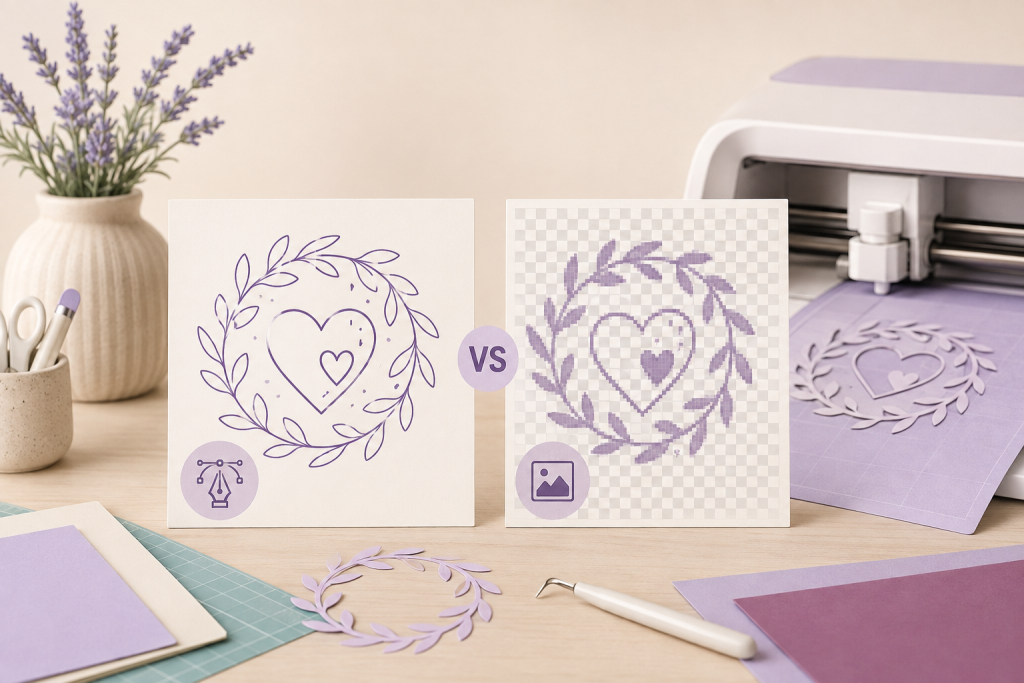
Quick answer: use an SVG when you need scalable vector cut paths and a design that may contain separate shapes or colors. Use a PNG when you need a pixel-based image, transparent background, or a Print Then Cut-style workflow. The right choice depends on the project and the way the file was built—not only the extension.
If you’re deciding between svg vs png for cricut, start with what the project needs to do — cut clean lines or print full-color artwork.
Cricut’s current image-upload guidance lists SVG, JPG, BMP, PNG, GIF, and DXF among supported upload types. A supported extension does not guarantee that every design will arrive with perfect layers, colors, or cut paths, so inspect the uploaded result before making materials.
That supported-formats list is a useful starting point for the svg vs png for cricut decision.
SVG vs PNG for Cricut at a glance
| Feature | SVG | PNG |
|---|---|---|
| File type | Vector | Raster image |
| Built from | Paths, shapes, and coordinates | Pixels |
| Scaling | Can scale without ordinary pixelation | Can soften or pixelate when enlarged |
| Typical Cricut use | Cut lines, layered or single-color designs | Print Then Cut, flattened artwork, or image-based tracing |
| Transparency | Supported by the design structure | Can preserve a transparent background |
| Main check | Are the paths and layers clean? | Is the resolution and background suitable? |
What an SVG file gives you
SVG stands for Scalable Vector Graphics. Instead of storing a fixed grid of pixels, it describes shapes and paths. That makes SVG useful for cut designs that need to be resized or separated by color.
That vector structure is the core of the svg vs png for cricut decision.
Cricut states that when an SVG is uploaded, its vectors are imported as cut lines. The result can still require changes: a line intended for drawing may need its operation changed, separate pieces may need attaching, and a design with unsupported fills or embedded raster content may not behave as expected.
Do not assume that “SVG” means “perfectly layered.” A designer can save a flattened-looking design inside an SVG container, combine shapes unexpectedly, or include effects that a cutting program cannot interpret in the same way.
What a PNG file gives you
PNG is a raster format. It is useful for full-color artwork, watercolor effects, photographs, shadows, gradients, and transparent-background images. Because the artwork is made from pixels, resolution matters. Enlarging a small PNG can make edges look soft.
That pixel basis is why the svg vs png for cricut choice matters for enlargement.
A PNG commonly enters Cricut workflows as a single image rather than a set of editable vector shapes. That can be appropriate for Print Then Cut, or for a simple silhouette when the background is clean and the selected cut area is correct.
If the PNG has a white rectangle behind the design, confirm whether that background should print, be removed, or be part of the cut shape. A transparent preview in a listing is not proof that the delivered file has transparency.
Choose SVG for these projects
- Single-color vinyl words or silhouettes.
- Layered designs where each color needs a separate material or operation.
- Projects that must be resized substantially.
- Cut paths that should remain crisp at different dimensions.
- Designs you expect to recolor by vector layer.
Before cutting, zoom in on small interior details. Thin lines, tiny islands, and narrow gaps may be difficult for a particular material or project size even when the SVG itself is valid.
Choose PNG for these projects
- Full-color Print Then Cut artwork.
- Artwork with gradients, textures, or photographic detail.
- Flattened designs where separate vector layers are not required.
- Transparent-background graphics used as one image.
- Reference previews when the project does not need editable paths.
Cricut’s guidance on unsupported SVG and DXF items explains that pattern fills, photographs, gradients, and similar raster effects may need to be exported as PNG or another image format instead of being treated as layered vector content.
That official guidance is a reliable reference for the svg vs png for cricut decision.
What file format does Cricut use?
Cricut Design Space accepts several image file types, but they do not behave the same way. Cricut currently groups common uploads into basic raster images such as JPG, BMP, PNG, GIF, and HEIC, and vector images such as SVG and DXF. Raster images upload as image artwork, while SVG and DXF are vector formats whose paths can become cuttable shapes.
That means the best Cricut file format depends on the project. Use SVG when you need scalable vector paths or separate shapes that were actually built into the file. Use PNG when you need a flattened pixel image, transparency, photographic detail, gradients, or a Print Then Cut-style workflow. Do not assume every file with an SVG extension contains multiple editable layers.
That project-first logic is the simplest way to settle svg vs png for cricut.
Cricut also notes an important platform limitation: DXF upload is not currently supported in Design Space for iOS or Android. Check the current Cricut image-upload documentation before relying on a format for a specific device.
How to check an upload in Design Space
- Keep the original ZIP or purchase archive unchanged.
- Extract the files before uploading. Use the Windows SVG unzip guide or the corresponding guide for your device if needed.
- Upload the intended SVG or PNG, not a small listing preview.
- Confirm the design dimensions after import.
- Inspect the Layers panel and operation assigned to each part.
- Zoom into narrow lines and small cutouts.
- Run a small material test before committing to a large project.
For the current supported formats and platform steps, use Cricut’s official image upload guide. Design Space controls can change, so current official instructions should take priority over an old screenshot.
Following official steps keeps the svg vs png for cricut workflow reliable.
Common SVG and PNG problems
The SVG arrives as one layer
The source may genuinely contain one combined path, or the design may use unsupported effects. Open the Layers panel and compare the result with the product’s file description. Do not assume every color shown in a preview will be independently editable.
The PNG has a box around it
The background may not be transparent. Check the actual delivered PNG rather than the listing thumbnail, and use the upload cleanup tools only when that fits the project.
The cut edges look rough
A low-resolution PNG or aggressive background removal can create uneven edges. A clean SVG may be better for a simple shape; a higher-resolution PNG may be better for detailed printed artwork.
That edge quality is a key tiebreaker in the svg vs png for cricut comparison.
The SVG reports unsupported content
Pattern fills, gradients, embedded images, clipping behavior, or other design features may not translate. Cricut’s unsupported image-upload guidance describes cases where exporting as PNG is more suitable.
That fallback is a practical part of the svg vs png for cricut decision.
What to verify before downloading a bundle
- The exact file formats included.
- Whether the design is layered, single-color, or flattened.
- Whether PNG files have transparent backgrounds.
- The license and permitted uses.
- Whether fonts are converted to paths or require separate installation.
- Whether a PDF is an instruction/reference file rather than a Design Space upload file.
- Whether the seller actually tested the stated software or machine workflow.
The broader SVG, PNG, and DXF format guide compares more file types without duplicating this Cricut-focused decision.
A verified multi-format design option
The Welcome Round Sign SVG Bundle has been verified as an archive containing SVG, DXF, EPS, PDF, and PNG files. Temply Studio has not independently tested every machine or software import path, so the product is described by the files actually present rather than a universal compatibility promise.
Review the listing’s current file and license details before purchase. Choose the format that matches your project, then test the imported design at a small scale.
For more svg vs png for cricut options, explore the Back-to-School SVG Bundle and Summer Beach SVG Bundle — both include cut-ready files tested for Design Space. Single designs like the Halloween Witch SVG and Dog Paw Print SVG are also popular for quick svg vs png for cricut projects.
Frequently asked questions
Is SVG always better than PNG for Cricut?
No. SVG is usually better for scalable cut paths and editable vector layers. PNG is often better for full-color or flattened Print Then Cut artwork.
The right svg vs png for cricut choice depends on whether you need editable paths or printed artwork.
Can Cricut cut a PNG?
A PNG can be uploaded as an image and used in image-based workflows, but it does not arrive as the same kind of vector path structure as an SVG. Review the selected cut area and current Design Space settings.
For true cut lines in the svg vs png for cricut decision, start with a clean SVG.
Do all SVG files contain separate layers?
No. The structure depends on how the file was created and exported. Inspect the actual Layers panel after upload.
When comparing svg vs png for cricut, always inspect the Layers panel — SVG quality varies by designer.
Should I upload the ZIP file?
No. Extract the archive first, then upload the intended SVG, PNG, or other supported image file.
Keeping that svg vs png for cricut distinction clear saves time and avoids wasted material.
Match the file to the result
Choose SVG when the project depends on clean vector cut paths and scalable shapes. Choose PNG when it depends on full-color pixel artwork or a flattened image workflow. In either case, verify the delivered file, inspect the upload, and run a small test before using expensive material.
That matching principle is the heart of the svg vs png for cricut decision.
Browse the SVG and cut-file collection for current listings, then check each product page for the exact formats and limitations.
Temply Studio
Stop chasing your goals with sticky notes and scattered notebooks. Our premium digital planners and Canva templates are designed to help you plan with intention, stay consistent, and actually enjoy the process.

Questions about this guide?
Ask about the planner, share how you use it, or tell us what to cover next. Your email stays private.