




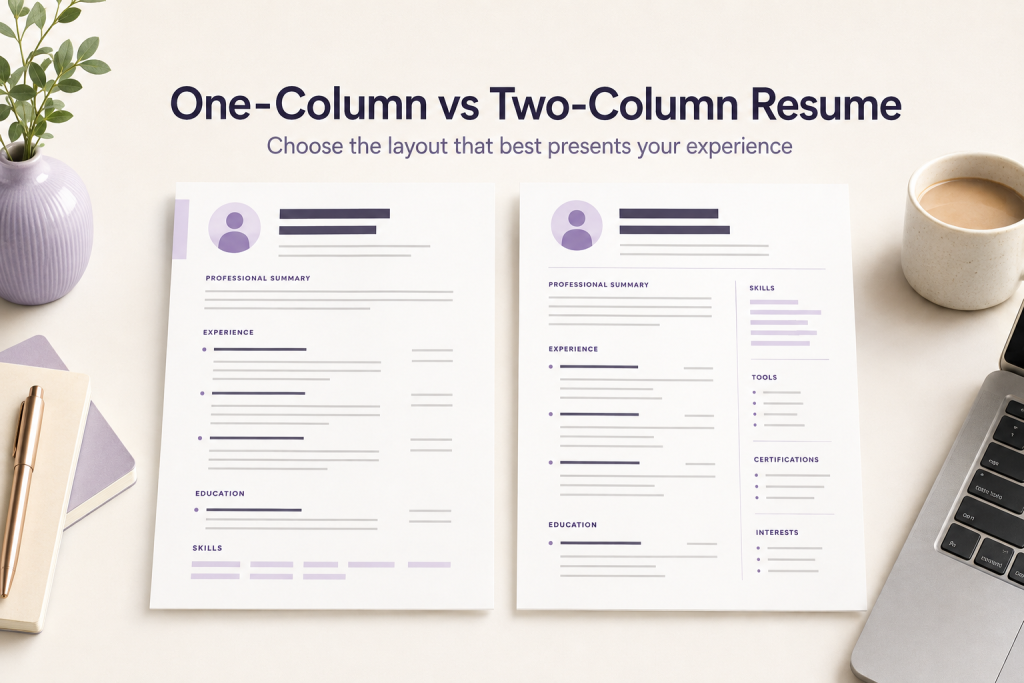
Choosing between a one-column and two-column resume can change how quickly a reader finds your experience, skills, and contact details. The best layout is not simply the one that looks most modern; it is the one that presents your most relevant information clearly and consistently.
If you’re weighing one column vs two column resume options, start with how a reader will scan the page.
CareerOneStop recommends formatting a resume so it is easy to read, emphasizes important information, and avoids inconsistent spacing, punctuation, and typography. Use those principles as your starting point when comparing layouts.
What is a one-column resume?
A one-column resume places the main content in a single reading path from top to bottom. Your contact information, summary, experience, education, and skills generally appear in one vertical sequence.
This structure is usually straightforward to scan because the reader moves through one section at a time. It also gives you more room for full-width job descriptions and achievement statements without compressing text into narrow areas.
What is a two-column resume?
A two-column resume divides the page into two vertical areas. The wider column often contains experience and education, while the narrower column may contain skills, contact details, languages, or other supporting information.
Two-column layouts can create a compact visual hierarchy, but they require more careful decisions about section order, spacing, alignment, and reading flow. A decorative layout should never make important information harder to locate.
One column vs two column resume: the main differences
| Consideration | One-column layout | Two-column layout |
|---|---|---|
| Reading flow | One clear vertical path | Requires deliberate visual hierarchy |
| Space for experience | More width for longer descriptions | Experience may need to share space with a sidebar |
| Visual style | Usually simple and structured | Can create a more compact, designed appearance |
| Editing | Often easier to revise section by section | Spacing and alignment may need closer review |
| Conservative ATS approach | Provides a straightforward structure to test | Should be checked carefully after export and before submission |
When a one-column resume may be the better choice
- You have several roles that need detailed descriptions.
- Your experience, education, and projects are the most important parts of the application.
- You want the simplest possible reading path.
- You are applying through an online system and want to reduce unnecessary layout complexity.
- You are changing careers and need room to explain transferable experience.
A one-column format can also make it easier to keep section order logical. For additional guidance, see this guide to resume section order for different career stages.
A one column vs two column resume decision often comes down to how much detail your experience needs.
When a two-column resume may be useful
- You need a compact way to separate supporting details from your work history.
- Your experience entries are concise and do not require the full page width.
- You can maintain a clear hierarchy between the main column and sidebar.
- The design remains readable when viewed on screen and after export.
A two-column format should support your content rather than compete with it. Keep headings distinct, use consistent spacing, and avoid placing essential details in a location that is easy to overlook.
The key question in any one column vs two column resume comparison is whether the second column helps or hides your strongest evidence.
How to choose the right resume layout
1. Start with the job requirements
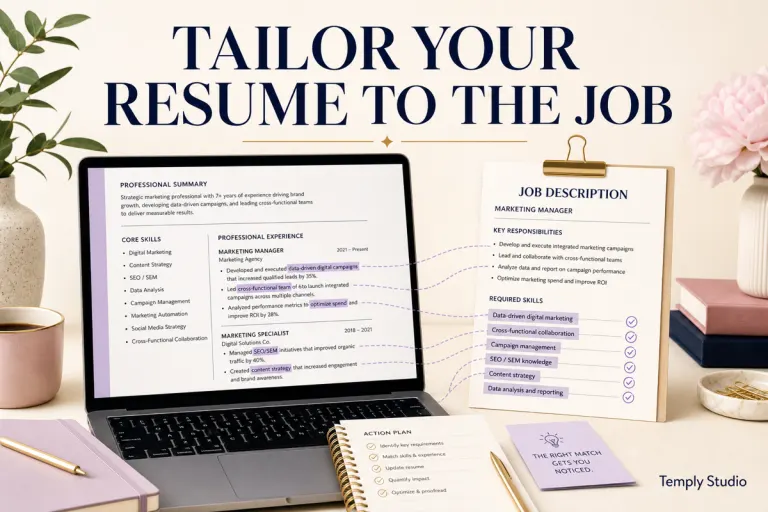
Review the job description and identify the experience, skills, and qualifications that deserve the most attention. Choose the layout that gives those details enough space and keeps them easy to find.
2. Count the content you need to include
If your work history contains substantial detail, a one-column layout may give your bullet points more usable width. If your supporting information is brief, a two-column layout may help organize it without overwhelming the page.
3. Check the reading order
Read the resume from the perspective of someone seeing it for the first time. Can you immediately identify your name, target role, recent experience, and most relevant skills? If the answer is unclear, simplify the layout or strengthen the hierarchy.
4. Keep formatting consistent
Use a limited font system, consistent heading treatment, aligned dates, and predictable spacing. CareerOneStop identifies inconsistent fonts, punctuation, and spacing as common resume-formatting problems, so inspect the document carefully before sending it.
5. Review the exported file
Save the final version in the format requested by the employer or application. When PDF is appropriate, Microsoft Support explains how to save or convert Office documents to PDF. Open the exported file and check that columns, line breaks, dates, and bullet points still appear as intended.
Resume column format: should you use 1 column or 2 columns?
If you are deciding between a 1-column or 2-column resume, start with the reading path. A one-column format keeps experience, education, and skills in one vertical sequence. A two-column format can save space by moving shorter items such as skills or contact details into a secondary column, but it also creates another reading path that you need to check carefully.
This one column vs two column resume check takes less than a minute and prevents most formatting regrets.
For most applications, choose the format that keeps your strongest evidence easy to find without shrinking type or forcing important details into a narrow sidebar. If a job portal gives file-format or document instructions, follow those instructions first. Then open the exported document and confirm that dates, headings, bullets, and section order still read logically.
- Choose one column when you have detailed work history, want a simple reading order, or need more full-width space for accomplishments.
- Choose two columns when your content is compact and the second column improves organization without making essential information harder to follow.
One-column vs two-column resume for ATS-oriented applications
No layout can guarantee a particular result in an application system. For a conservative approach, prioritize clear headings, readable text, consistent spacing, and a logical order of information. Then test the exported file by opening it on your own device and reviewing whether the content remains easy to follow.
If you use a two-column design, pay special attention to the order in which the content is read and whether the sidebar contains information that is essential to understanding your qualifications. If you are uncertain, a clean one-column version is a practical alternative.
Which layout should you choose?
Choose a one-column resume when clarity, detailed experience, and a simple reading path are your priorities. Choose a two-column resume when a compact structure improves organization without reducing readability.
The strongest choice is the layout that makes your relevant evidence easiest to review. Before applying, proofread the content, confirm the formatting survived export, and use the file type requested in the application instructions.
There’s no universal winner in the one column vs two column resume debate — the right choice depends on your content and target role.
For related decisions, read how to choose a resume template for a career change, how to build a clear skills section in a resume template, and how to add a portfolio link to a resume.
Explore resume templates
When you are ready to compare layouts and start customizing your document, browse the resume template collection and choose a structure that keeps your experience clear, relevant, and easy to review.
Compare one column vs two column resume templates in the collection to see which layout fits your content best.
One column vs two column resume: frequently asked questions
Is a one column or two column resume better for applicant tracking systems?
For ATS-oriented applications, a simple one column vs two column resume layout with a clear reading order is safest. Single-column designs are the most conservative choice, but a well-structured two-column layout can also work if the reading order is logical. Always test the exported file before submitting.
Can I use a two-column resume in a conservative industry?
Yes, but keep the design restrained. In conservative fields, a one column vs two column resume choice should favor clarity over visual flair — use the second column sparingly for skills or contact details, not for core experience entries.
Where can I find one column vs two column resume templates?
Browse the resume template collection to compare one column vs two column resume templates side by side. The Modern CV Template for Word & Canva offers a clean single-column layout, while the ATS Resume Career Bundle includes ATS-friendly options for Word and Google Docs.
Should I switch my resume from two columns to one column?
If your experience needs more room or you’re applying through strict ATS portals, switching to a one column vs two column resume with a single-column layout is a safe move. The content matters more than the column count, so prioritize clarity.
Sources
Temply Studio
Stop chasing your goals with sticky notes and scattered notebooks. Our premium digital planners and Canva templates are designed to help you plan with intention, stay consistent, and actually enjoy the process.
Questions about this guide?
Ask about the planner, share how you use it, or tell us what to cover next. Your email stays private.