




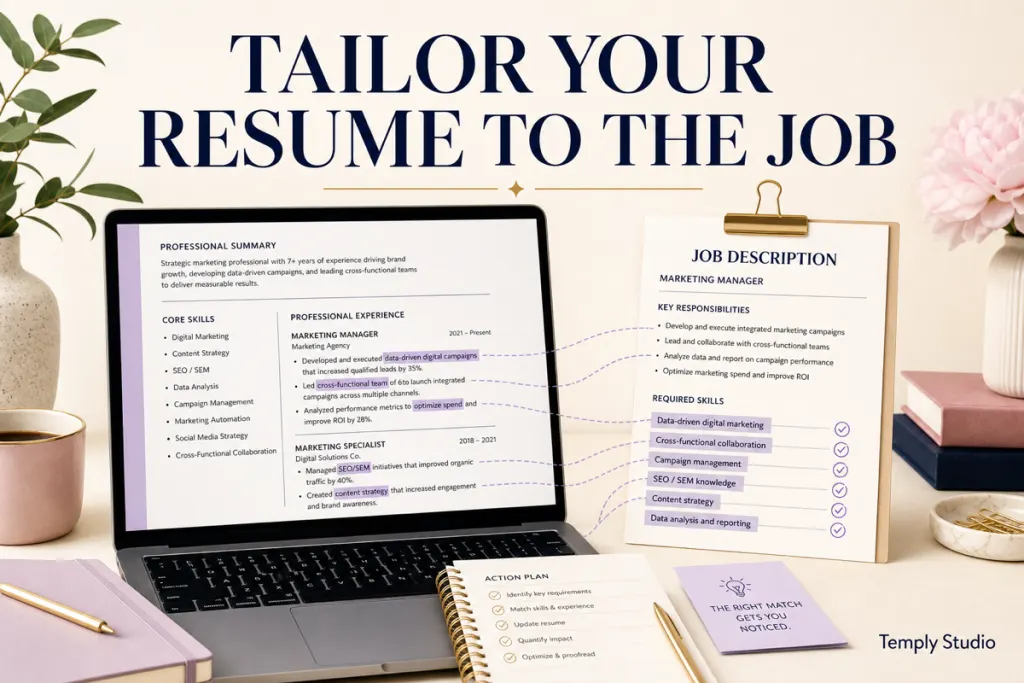
Quick answer: To tailor a resume template to a job description, identify the employer’s required skills and responsibilities, choose the experience that best proves those requirements, rewrite your summary and bullets around accurate evidence, then review the final layout and requested file type. Tailoring means making relevance easier to see; it does not mean copying keywords you cannot support.
A template gives you structure. The job description tells you what information deserves emphasis. Your task is to connect the two without inventing qualifications or allowing formatting to hide the evidence.
1. Save a master resume before tailoring
Keep one complete version containing your work history, skills, education, projects, and achievements. Duplicate that file for each serious application. A master resume reduces the chance that you permanently delete useful material while shortening a targeted version.
2. Read the job description for requirements, not buzzwords
Create three small lists:
- Required: skills, qualifications, tools, credentials, or experience stated as necessary.
- Preferred: useful but not essential qualifications.
- Responsibilities: work you would actually be expected to perform.
CareerOneStop recommends targeting a resume to the job’s requirements and emphasizing work that relates to the target position. Use that principle to decide what moves upward, what needs more detail, and what can be shortened.
3. Mark the requirements you can honestly prove
For each important requirement, find evidence in your own history. Evidence can be a project, result, responsibility, tool, course, certification, or measurable outcome. If you cannot support a requirement, do not add it simply because it appears in the posting.
4. Choose the most relevant experience
Your most relevant experience does not always mean your most recent task. Within each role, emphasize the responsibilities and outcomes that connect to the target job. CareerOneStop’s resume guidance recommends highlighting skills, tasks, and outcomes that relate to the job goal rather than listing every duty.
This is especially important when your previous title is different from the target role but the underlying work overlaps.
5. Rewrite the headline or summary
If you use a headline or professional summary, make it specific to the target. Use accurate role language and two or three strengths you can prove. Avoid generic phrases such as “hard-working professional seeking a challenging opportunity.”
A useful summary answers: What type of role am I targeting? What relevant experience or capability do I bring? What evidence makes that claim credible?
6. Rewrite experience bullets around evidence
Instead of copying a responsibility from the job description, write what you actually did. A strong bullet usually contains an action, context, and result or scale.
| Weak | Stronger approach |
|---|---|
| Responsible for customer service | Resolved customer order issues across phone and email while coordinating follow-up with operations. |
| Managed social media | Planned weekly content, coordinated approvals, and reviewed campaign engagement to adjust the next content cycle. |
| Worked with reports | Built weekly performance summaries from operational data and flagged exceptions for team review. |
Use numbers only when they are true and you can explain what they measure.
7. Mirror terminology carefully
When the employer and your experience use different names for the same concept, it can be helpful to use the employer’s standard term if it remains accurate. For example, if your internal team called something “ticket handling” and the posting calls it “support case management,” you can use clearer industry language as long as it truthfully describes the work.
Do not hide extra keywords in white text or add skills you have never used.
8. Reorder sections when relevance changes
A recent graduate may place education or projects earlier. An experienced applicant may lead with a relevant summary and work history. A career changer may need a concise skills section that connects transferable experience to the new role while still keeping a clear work history.
For layout guidance, use the ATS-aware resume template guide.
9. Keep the length proportional to useful evidence
Do not cut relevant evidence merely to force one page, and do not expand weak content to fill two. The one-page vs two-page resume guide explains how to choose the shortest length that still supports the application.
10. Check the requested file type
The application portal’s instruction takes priority. Keep an editable working file, then create the requested submission format. If you are deciding between formats, see the resume PDF vs DOCX comparison.
11. Review the template after content changes
Tailoring often changes line lengths and page breaks. Check headings, dates, bullet alignment, spacing, page count, and contact details after every substantial edit. A clean template can become difficult to read after several copy-and-paste changes.
If your working file is in Microsoft Word, the Word resume editing guide provides a step-by-step cleanup workflow.
12. Run an evidence check before submitting
Read every claim and ask: Could I explain this in an interview with a specific example? If not, rewrite it. Tailoring should improve relevance without changing the truth of your experience.
A 15-minute tailoring pass
- Underline the top five requirements.
- Match each requirement to one piece of evidence from your master resume.
- Update the summary or headline.
- Rewrite three to five bullets to make relevant evidence clearer.
- Remove or shorten information that does not help this application.
- Check layout, dates, contact details, and requested file type.
- Proofread the exported submission copy.
Common mistakes
- Copying the job description into the resume.
- Adding unsupported skills because they appear as keywords.
- Tailoring the design but leaving generic content.
- Deleting work-history context that helps a reviewer understand your experience.
- Changing the file without keeping a master version.
- Assuming a template guarantees ATS parsing or an interview.
Frequently asked questions
Should I tailor my resume for every job?
For roles you seriously want, a targeted version can make relevant evidence easier to find. The amount of editing depends on how different the job is from your current version.
Can I use exact keywords from the job description?
Yes when they accurately describe your skills or experience. Do not add terms you cannot support.
Should I change my job titles?
Preserve the truth of your employment history. If an internal title needs context, you can clarify it carefully rather than replacing it with a different position.
Does tailoring guarantee ATS success?
No. Applicant tracking systems vary. Clear structure and relevant, truthful content can improve readability, but no template can guarantee how every employer’s system processes a file.
Official guidance
Choose an editable starting point
Browse the Temply Studio resume template collection only after verifying the exact included file formats, editing software, delivery, and license on the individual product page.
Compare the final resume with the posting one last time
Before submission, place the job description beside the final resume and check the major requirements one by one. Confirm that the strongest relevant evidence is easy to find. If an important requirement is not represented because you genuinely lack it, leave it unsupported rather than disguising the gap.
Keep a tailoring notes file
For recurring job families, keep a private note of strong evidence, project examples, and verified metrics you have used before. This can make future tailoring faster without copying an old targeted resume blindly. Recheck every example against the new posting.
Tailor the order of evidence, not the facts
You can move a relevant project upward, expand a useful bullet, or shorten unrelated detail. What should not change is the truth of dates, titles, responsibilities, education, credentials, or results. Relevance can change from job to job; history should not.
Use the employer language only when it matches your experience
A posting may call a skill by a formal name that your previous workplace did not use. If the term accurately describes your experience, clearer industry language can help. If the term describes a tool, certification, or responsibility you did not have, leave it out.
Keep a clean final submission copy
After tailoring, save the editable source and export or save a separate submission file in the requested format. Open that final copy independently and check page breaks, links, characters, dates, and contact information before uploading it.
Use a filename that clearly identifies you and the target role so the submission copy is easy to distinguish from older drafts.
Final quality check
Before relying on the workflow, reopen the file or page and verify the result in the context where it will actually be used. Confirm labels, links, dates, filenames, layout, and any output that matters. Keep the source copy separate so a failed experiment remains reversible.
Temply Studio
Stop chasing your goals with sticky notes and scattered notebooks. Our premium digital planners and Canva templates are designed to help you plan with intention, stay consistent, and actually enjoy the process.
Questions about this guide?
Ask about the planner, share how you use it, or tell us what to cover next. Your email stays private.