

GoodNotes for medical students is one of the smartest upgrades you can make to your study setup. Medical school throws an enormous volume of information at you — lecture slides, anatomy diagrams, drug lists, clinical checklists, and rotation schedules — and the students who cope best are rarely the ones who study the longest. They are the ones whose notes are organised, searchable, and easy to revise. GoodNotes turns your iPad into a single digital notebook system that holds all of it, from your first anatomy lecture to your final clinical rotation.
In this guide, you will learn how to set up GoodNotes for medical school from scratch: how to structure your notebooks by subject and rotation, how to take lecture notes that actually help you revise, how to use drawing and handwriting to memorise anatomy, how to build flashcards inside GoodNotes, and how to keep a rotation log that makes your clinical years far less stressful. Whether you are a first-year student or starting clerkships, the system below works.
Quick answer: GoodNotes for medical students works best as a linked notebook system: one notebook per subject in the pre-clinical years (anatomy, physiology, pharmacology, pathology), one notebook per clinical rotation, plus a single master planner for deadlines, exams, and revision. Import lecture PDFs, annotate them by hand, sketch anatomy diagrams from memory, and turn key facts into flashcards. Set the whole system up in one afternoon, then follow the same weekly rhythm.
Why GoodNotes Works So Well for Medical School
Medical school is a volume problem before it is a difficulty problem. A single week can mean hundreds of slides, dozens of new drug names, and several anatomy structures you have never seen before. Paper notes cannot keep up: they cannot be searched, they cannot be reorganised, and they multiply into piles you never revisit. GoodNotes solves the three problems that matter most.
First, everything is searchable. GoodNotes can search your handwriting, so a drug name you scribbled in week three is findable in week thirty. When a consultant asks you about a condition on the ward, you can pull up your notes in seconds instead of guessing. That searchability is the single biggest advantage over paper, and it compounds over four to six years of study.
Second, you can annotate the material you are actually given. Most medical schools hand out lecture slides as PDFs, and GoodNotes lets you import those PDFs directly, write on them, highlight them, and add your own summary pages between slides. You stop copying out slides by hand and start engaging with them — which is where real learning happens.
Third, your notes travel with you. An iPad is lighter than a stack of textbooks, and your entire library of notes fits in your bag on the ward. Between patients, you can review a checklist, check a drug dose you noted, or sketch a quick diagram for a colleague. That portability is exactly why so many medical students switch to GoodNotes in their first year and never go back.
Set Up Your Medical School Notebook System
A good system is simple enough that you will actually use it every day. Do not over-engineer it. The structure below has four parts, and you can build it in about an hour.
Step 1: Create one notebook per subject
In the pre-clinical years, create a separate GoodNotes notebook for each subject: anatomy, physiology, biochemistry, pharmacology, pathology, and microbiology. Give each notebook a clear cover page with the subject name and the semester. Inside each notebook, start every lecture with a dated page and the lecture title at the top. This sounds basic, but it is what makes your notes findable months later when you are revising for finals.
Use a consistent page template for lecture notes: a wide margin on the left for key terms, the main area for notes and diagrams, and a summary box at the bottom. The 2026 Academic Student Planner for GoodNotes is built around exactly this kind of structure, with dated academic pages and space for assignments and exams alongside your notes.
Step 2: Build a master planner
Your notebooks hold knowledge; your planner holds your life. Keep one master planner for lecture timetables, assignment deadlines, exam dates, and revision blocks. A hyperlinked planner lets you jump from a monthly overview to a daily page in one tap, which matters when your timetable changes weekly. The 2027 Life Planner works well as that single home base, with daily, weekly, and monthly pages you can link to your subject notebooks.
Step 3: Set up a rotation notebook template
Before your clinical years, build one rotation notebook template and duplicate it for every placement. Each rotation notebook should have the same sections: rotation goals, daily log, common conditions, procedures observed, drug list, and a reflection page. When every rotation looks the same, you spend your energy learning instead of reorganising.
Step 4: Decide your backup habit now
Losing a year of notes the week before exams is a nightmare you can prevent in five minutes. Turn on iCloud sync and set up GoodNotes auto-backup to a cloud drive, and test the restore once so you know it works. Backups are boring until the day they save your degree — make them automatic and forget about them.
Lecture Notes That Actually Help You Revise
Most students take lecture notes the wrong way: they transcribe the slides. Transcription feels productive, but it is passive, and passive notes are almost useless for revision. GoodNotes gives you better options.
Import the lecture PDF before the lecture starts. Skim the slides for ten minutes and write down three questions you want answered. During the lecture, annotate the slides instead of copying them: circle the key mechanism, add a one-line explanation in your own words, and star anything the lecturer repeats or emphasises. Lecturers repeat what they will examine.
After the lecture, spend fifteen minutes on the same day turning your annotations into a one-page summary. This is the highest-value study habit in medical school. Write the three take-home messages, draw the key pathway or mechanism from memory, and list the drug names or structures you still cannot recall without looking. That summary page is what you will revise from — not the fifty slides.
Use colour deliberately, not decoratively. Pick a simple system and stick to it for every subject: one colour for definitions, one for mechanisms, one for clinical correlations, and one for exam hints. When you open a page months later, the colours tell you what kind of information you are looking at before you read a word.
Anatomy Notes: Draw It to Remember It
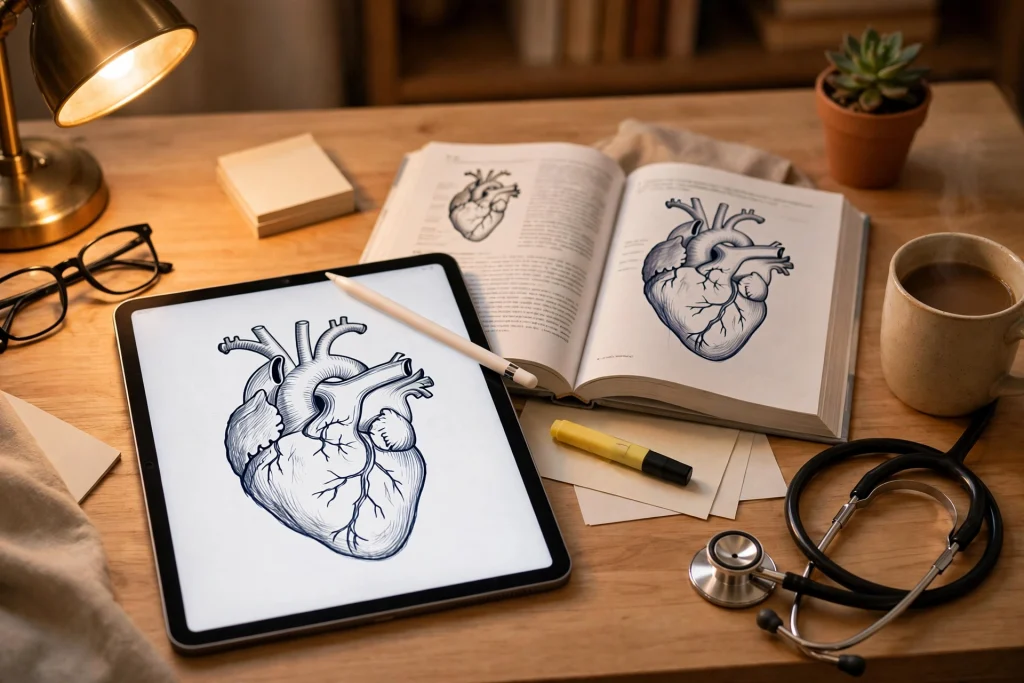
Anatomy is the subject where GoodNotes earns its keep. You cannot memorise the brachial plexus or the branches of the external carotid artery by reading a list — you have to draw them, repeatedly, until your hand knows them.
GoodNotes is built for this. Use the pen tool to sketch structures from memory, then check your sketch against the textbook and correct it in a different colour. That correction step is where the learning happens: the gap between what you drew and what is correct is exactly what you need to remember. Do the same sketch again a week later, and again before the exam. Each attempt gets faster and more accurate.
Layer your drawings. Start with a rough outline of a region, then add muscles on one page, vessels on the next, and nerves on the third. The GoodNotes zoom window lets you write small, neat labels even on crowded diagrams. If you are studying with a friend, export a blank diagram and quiz each other by labelling it — active recall beats re-reading every time.
Keep a dedicated anatomy sketchbook notebook alongside your lecture notes. Fill it with your own drawings, not screenshots: a hand-drawn diagram you made yourself is worth ten perfect images you saved and never looked at again.
Flashcards and Active Recall in GoodNotes
Active recall — testing yourself instead of re-reading — is the most evidence-backed study method in medical education, and GoodNotes supports it surprisingly well. You do not need a separate flashcard app to get most of the benefit.
Build a flashcard notebook with one question per page: the question at the top, a large blank space in the middle, and the answer hidden at the bottom or on the next page. Write the answer from memory before you reveal it. The physical act of writing the answer by hand, then checking it, is far more memorable than tapping a “got it” button.
Organise flashcards by system rather than by lecture. A card about heart failure belongs with your cardiology cards, even if you first met it in a physiology lecture. When you revise, you revise by system, which is how exams are organised and how patients present. Add a small tag on each card — “high yield”, “seen on the ward”, “always forget this” — so you can prioritise the cards that matter most in the final week.
For spaced repetition, keep it simple: new cards get reviewed the next day, then after three days, then after a week. GoodNotes does not schedule reviews for you, so mark each card with the date of your next review in the corner. A low-tech system you actually follow beats a perfect system you abandon by February.
Clinical Rotations: Logs, Checklists and Patient Notes
Clinical years change what your notes are for. You are no longer just memorising facts; you are tracking patients, procedures, and your own learning. GoodNotes for medical students really proves itself here, because a rotation notebook is both a study tool and a professional record.
Keep a daily log on every rotation. One page per day: the patients you saw, the presentations you encountered, the procedures you observed or performed, and one thing you learned. That log becomes gold at the end of the rotation when you write your reflection, prepare for your supervisor meeting, or revise for the OSCE. Students who keep a daily log almost always outperform students who try to reconstruct six weeks from memory.
Build checklists for each rotation’s core presentations. On paediatrics, that might be the febrile child, the wheezy child, and the vomiting child. On surgery, it might be the acute abdomen, the post-operative patient, and the trauma assessment. A one-page checklist per presentation — history questions, examination steps, investigations, and red flags — is something you can review in the corridor before you walk into the room.
Take patient notes carefully and legally. Never write identifiable patient details in your personal notes: use initials or a case number, and follow your medical school’s rules on confidentiality. GoodNotes notebooks are not part of the hospital record, and they should never contain anything that could identify a patient. Keep your notes about the medicine, not about the person.
The Nursing School Planner 2027 is also worth a look for medical students on clinical placements — its shift-planning pages, clinical checklists, and patient-care trackers translate well to medical rotations, especially for organising ward rounds and on-call shifts.
A Weekly Rhythm That Keeps You on Track
Systems fail without a rhythm. The one below takes about two hours a week outside lectures, and it is what turns a pile of notes into actual knowledge.
- Monday: Plan the week in your master planner. Note every lecture, deadline, and clinical session, and block your revision time first — before anything else fills it.
- Daily after lectures: Fifteen minutes per lecture to write your one-page summary and make any flashcards from that day’s material.
- Wednesday: Review the flashcards you made on Monday and Tuesday. Anything you cannot recall goes back into the pile for Friday.
- Saturday morning: One focused hour. Redraw the week’s key anatomy diagram from memory, review the week’s summaries, and tidy any notebook that got messy.
- Sunday evening: Ten minutes to look at next week’s timetable and set your intention for the week: one subject to prioritise, one weakness to work on.
That rhythm is deliberately light. Medical school is a marathon, and the students who burn out are usually the ones who tried to study twelve hours a day in October. Consistency beats intensity, and a system you can sustain for six years beats one that collapses in six weeks.
Common Mistakes to Avoid
The most common mistake is collecting templates and never using them. A beautiful planner you never open is worse than a plain notebook you use daily. Pick your system, set it up in an afternoon, and then stop organising and start studying.
The second mistake is importing every slide deck and never annotating it. An untouched PDF in your library is not a note — it is a filing cabinet. If you did not add a single annotation, you did not study that lecture.
The third mistake is making notes too neat. Notes are a tool, not a portfolio. Messy notes with your own words, arrows, and questions are better than beautiful notes copied from the textbook. The exam does not grade your handwriting; it tests whether you can recall and apply what you learned.
The fourth mistake is studying alone all the time. Teaching a classmate from your GoodNotes pages — walking them through a mechanism, sketching it for them — is one of the fastest ways to find the gaps in your own understanding. Your notes become teaching material, and teaching is the deepest form of learning.
Frequently Asked Questions
Is GoodNotes worth it for medical students?
Yes, for most medical students it is. The combination of searchable handwriting, PDF annotation, and a notebook system that lasts your whole degree is hard to match with paper or with a generic notes app. The free plan gives you three notebooks to try it, so you can test the workflow on one subject before paying for unlimited notebooks.
Can GoodNotes replace textbooks in medical school?
No — GoodNotes replaces your notebooks, not your textbooks. You still need proper reference material. What GoodNotes replaces is the pile of paper notebooks, printed slides, and loose handouts, and it makes the knowledge in your textbooks searchable and revisable.
How do I organise GoodNotes for medical school?
Use one notebook per subject in the pre-clinical years, one notebook per clinical rotation, and one master planner for deadlines and revision. Keep the structure identical across notebooks so you always know where to find things, and use a consistent colour system for definitions, mechanisms, and clinical correlations.
Can I use GoodNotes on the wards?
Yes, and many students do — an iPad is discreet, portable, and easy to clean. Keep your notes free of identifiable patient information, follow your hospital’s device policy, and never let note-taking get in the way of listening to the patient in front of you.
Does GoodNotes work for USMLE or finals revision?
Yes. The same system scales to exam revision: your one-page lecture summaries become your revision notes, your flashcard notebook becomes your active recall bank, and the handwriting search lets you find any topic in seconds. Many students do their entire finals revision from the notebooks they built over the previous years.
Medical school rewards the students who build a system early and trust it. GoodNotes for medical students is not magic — it is a notebook that searches, organises, and travels with you, and that is enough to change how you study. Set up your notebooks this weekend, try the weekly rhythm for a month, and let your revision results tell you whether it works.
Ready to build your medical school system? Start with the 2026 Academic Student Planner for GoodNotes for your pre-clinical years, add the Nursing School Planner 2027 when rotations begin, and keep it all together in the 2027 Life Planner. If you are new to digital planning, our guide on how to use a digital planner in GoodNotes walks you through the basics first.
Temply Studio
Stop chasing your goals with sticky notes and scattered notebooks. Our premium digital planners and Canva templates are designed to help you plan with intention, stay consistent, and actually enjoy the process.
Questions about this guide?
Ask about the planner, share how you use it, or tell us what to cover next. Your email stays private.