




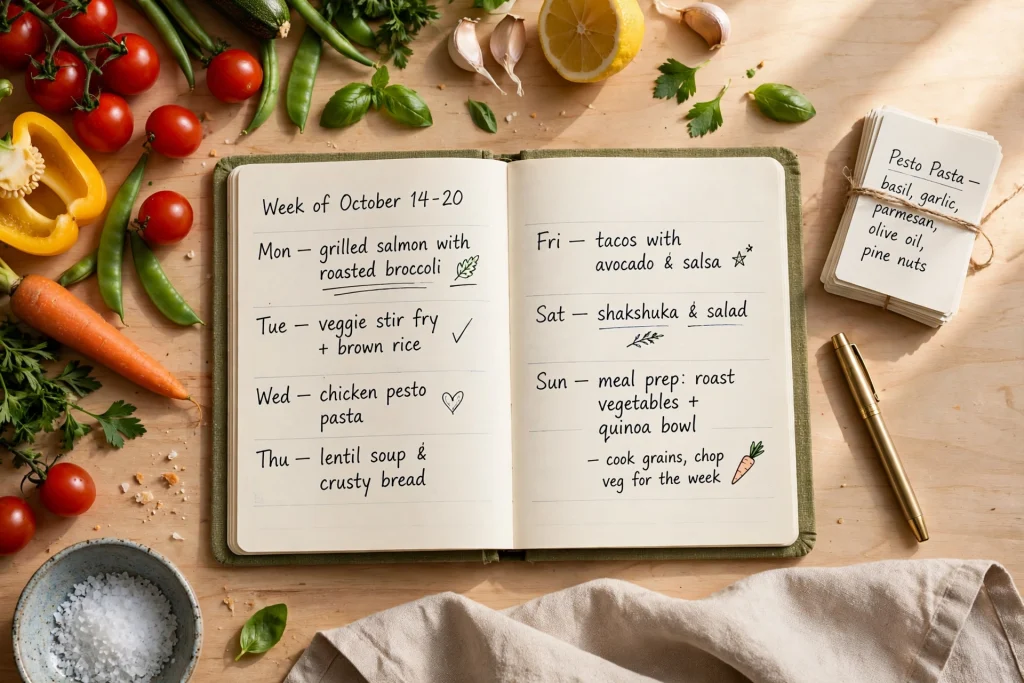
What Is Digital Meal Planning?
Digital meal planning is simply the habit of mapping out your meals for the week using a digital planner, app, or printable template instead of a scrap of paper that gets lost in a drawer. You decide what to eat for breakfast, lunch, and dinner ahead of time, turn that plan into one focused grocery list, and shop once. That is the whole idea — but the results are anything but small. People who plan their meals tend to spend less on groceries, waste less food, and eat better simply because the week-night scramble disappears.
If you have ever stood in front of the fridge at 6 p.m. wondering what to make, you already know the cost of not planning. Takeout becomes the default, fresh produce wilts in the back of the fridge, and the grocery bill creeps up without anyone noticing. A digital approach fixes this because your plan lives in one place, it is easy to reuse week after week, and you can update it from your phone while standing in the store aisle.
Why Digital Meal Planning Works Better Than Winging It
Paper lists work fine, but digital meal planning has a few quiet advantages that make the habit easier to keep. First, your plan is searchable and reusable. Last month’s week of easy dinners can become this month’s again with a quick copy instead of a fresh brainstorm. Second, you can edit on the fly. When plans change — a late meeting, a friend inviting you to dinner — you adjust the plan in seconds instead of crossing things out until the page is unreadable.
Third, a digital template keeps everything connected. Your weekly menu, your recipe collection, and your grocery list can live in the same document, so nothing gets lost between three separate notebooks. And if you prefer paper for the kitchen, most digital templates print beautifully, so you get the best of both worlds.
Digital Meal Planning 101: The 30-Minute Weekly System
Here is a simple system that takes about 30 minutes once a week. Pick a consistent time — Sunday afternoon works well for most people — and follow these five steps in order.
Step 1: Check your schedule and fridge (5 minutes)
Before planning a single meal, look at your week. Which nights are you home for dinner? Which days are packed and need something fast? Planning meals for nights you will not be home is the most common beginner mistake, and it is how food gets wasted. Next, peek in the fridge and pantry. Note anything that needs using up this week — half a carton of eggs, wilting spinach, that can of beans you bought on impulse. Planning around what you already have saves money and cuts waste at the same time.
Step 2: Choose your meals with a theme framework (10 minutes)
Choosing seven brand-new meals every week is exhausting, so do not. Instead, use a loose theme system that makes decisions for you. A classic rotation looks like this:
- Monday: Pasta night
- Tuesday: Taco or grain-bowl night
- Wednesday: One-pan or sheet-pan dinner
- Thursday: Soup or slow-cooker meal
- Friday: Homemade pizza or takeout night
- Saturday: Try a new recipe
- Sunday: Roast or big-batch cooking night
Keep breakfasts and lunches simple and repeatable: oatmeal, yogurt, toast, and eggs cover most breakfasts; lunches can rotate between leftovers, salads, and sandwiches. Write each dinner next to its day in your planner, and note the recipe source if you need it.
Step 3: Build your grocery list from the plan (10 minutes)
Go through your planned meals one by one and write down every ingredient you do not already have. Then organize the list by store section — produce, dairy, meat, pantry, frozen — so you can walk the store in one pass without backtracking. This is the step that pays for itself: a list built from a plan stops the “grab whatever looks good” impulse shopping that inflates grocery bills.
Digital templates shine here because you can keep a running list on your tablet or phone and tick items off as you shop. Some planners include a dedicated grocery list page next to the weekly menu, which keeps everything in one view.
Step 4: Schedule one prep session (5 minutes)
You do not need a four-hour Sunday meal-prep marathon. One short prep session — washing and chopping vegetables, cooking a grain like rice or quinoa, marinating a protein — makes weeknight cooking dramatically faster. Block 30 to 60 minutes on your weekend, ideally right after you put the groceries away, and knock out the boring parts while everything is fresh and unpacked.
Step 5: Leave one flex night
Life happens. Leave one night a week unplanned on purpose — for leftovers, a spontaneous invitation, or simply a night off from cooking. A plan with breathing room survives real life; a rigid plan gets abandoned by Wednesday.
Grocery List Tips That Save Money and Time
A good list is a money-saving tool, not just a memory aid. Start by auditing what you already own before adding anything to the list — duplicate purchases are one of the biggest sources of food waste. Stick to your list in the store; the rule “if it is not on the list, it waits until next week” handles most impulse buys.
Buy seasonal produce when you can, since it is usually cheaper and tastes better. Plan at least two meals around the same ingredients — roast chicken on Sunday becomes chicken tacos on Tuesday and chicken soup on Thursday — so nothing languishes. And keep a short list of 10 to 15 go-to meals you love. When you are too tired to think, you can plan a week from that list in minutes.
Time-Saving Digital Meal Planning Ideas
Once the basic system is running, these upgrades make it even smoother:
- Duplicate and tweak: Keep a copy of each week’s plan. Next time you need an easy week, copy it and swap two or three meals.
- Build a recipe bank: Save tried-and-true recipes in one place with notes on cook time and family rating. A personal recipe collection beats endless scrolling for ideas.
- Batch-cook staples: Grains, shredded chicken, hard-boiled eggs, and roasted vegetables mix and match into dozens of meals.
- Use planner templates: A dedicated meal planning template with weekly grids, recipe pages, and grocery lists keeps the whole system in one tidy file you can reuse forever.
A Seasonal Recipe Planner is a great fit here: it combines a digital meal planning template with recipe pages and a shopping list, so your menu, recipes, and groceries stay connected in one printable layout.
Common Digital Meal Planning Mistakes to Avoid
Mistake 1: Planning meals you do not actually like to cook. A plan full of ambitious recipes you dread will not survive the week. Start with easy, familiar meals and add one new recipe at a time.
Mistake 2: Skipping the schedule check. Planning a roast for a night you have a late meeting guarantees waste. Always plan around your real week.
Mistake 3: Forgetting snacks and breakfasts. If you only plan dinners, the daytime meals stay chaotic. Keep them simple and repeatable, but do write them down.
Mistake 4: Trying to be perfect from week one. Your first few plans will be rough. The system gets faster and more accurate every week as you learn what your household actually eats.
Digital Meal Planning FAQ
How long does digital meal planning take each week?
About 30 minutes once you have the system down. The first week or two may take a little longer while you gather your go-to recipes, but the weekly session shrinks as your recipe bank grows and you start reusing plans.
Is digital meal planning better than paper meal planning?
Neither is objectively better — it depends on what you will actually keep using. Digital meal planning makes copying, editing, and reusing plans easier, and it keeps your menu, recipes, and grocery list in one place. Paper is simpler and always visible in the kitchen. Many people use both: a digital planner for the system and a printed grocery list for the store.
What should I plan — dinners only, or every meal?
Start with dinners, since they are usually the biggest source of stress and spending. Once that feels easy, add simple repeatable breakfasts and lunches. You do not need elaborate plans for every meal — routine is fine for mornings and midday.
How do I meal plan for picky eaters?
Build meals around a flexible base — tacos, grain bowls, pasta, or stir-fry — and let everyone customize their own plate. Plan one or two “safe” meals everyone likes each week, and rotate new recipes in gradually rather than overhauling everything at once.
Can a digital planner really replace a meal planning app?
For most people, yes. A good template gives you the weekly layout, recipe pages, and grocery list without subscriptions, ads, or a learning curve. Apps are useful if you want barcode scanning or nutrition tracking, but for pure planning, a reusable template plus a tablet or printout does the job.
Start Your Digital Meal Planning System This Week
The best time to start digital meal planning is this weekend. Block 30 minutes, open a weekly template, check your fridge, pick your theme nights, and write your grocery list. One planned week is all it takes to feel the difference — calmer evenings, less waste, and a grocery bill that finally makes sense.
Pair your meal plan with the rest of your week in one place: browse the digital planner shop page to find a planner that fits how you organize everything else, from appointments to habits to meal prep.
Ready to make dinner decisions once a week instead of every night? Browse all planners and templates and find the layout that makes planning feel easy.
Temply Studio
Stop chasing your goals with sticky notes and scattered notebooks. Our premium digital planners and Canva templates are designed to help you plan with intention, stay consistent, and actually enjoy the process.


Questions about this guide?
Ask about the planner, share how you use it, or tell us what to cover next. Your email stays private.