



Quick answer
GoodNotes time blocking means assigning every hour of your day a job before the day starts — work, meals, rest, errands — and writing those blocks into your digital planner. Build one reusable daily template with hourly rows, colour-code each type of block, and review it for two minutes each evening. Most people feel the difference within a week: fewer forgotten tasks, less decision fatigue, and a day that ends when you planned it to end.
Table of Contents
What Is GoodNotes Time Blocking, and Why Does It Work So Well?
Time blocking is the simplest productivity system that actually survives contact with a real day. Instead of keeping a to-do list and hoping you get to everything, you give each task a home on the clock. A 9:00–10:30 block says “write the report”. A 12:30–13:00 block says “lunch, away from the desk”. When the time arrives, you already know what to do — no re-deciding, no scrolling through a list wondering what matters most.
GoodNotes is a natural home for this system. Unlike a calendar app, your planner page is a visual canvas: you can see the whole day at a glance, draw blocks with your Apple Pencil, move things by dragging them, and colour-code by energy or category. Unlike paper, nothing is permanent — a meeting that moves takes two seconds to erase and redraw. And because your planner lives on your iPad, it is with you at your desk, on the sofa, and in the meeting room.
Research on attention backs the idea up. Psychologists call the mental cost of switching between unfinished tasks “attention residue”: every time you jump from one thing to another without finishing, part of your brain stays behind. Time blocking reduces that residue because you commit to one thing per block. You are not multitasking; you are single-tasking on a schedule.
This guide walks you through setting up GoodNotes time blocking from scratch: the template, the colour system, the daily routine, and the fixes for the five problems that make most people quit in week two.
Step 1: Build Your GoodNotes Time Blocking Template
You do not need a fancy template to start. You need a page with hours down the side and space to write. Here is how to build one you will actually reuse.
Choose your hours
Start by deciding the span your day covers. Most people block from 7:00 to 22:00. If you work nights or study late, shift the window — the template should match your life, not someone else’s. Leave the hours you are asleep off the page entirely; a template that starts at midnight invites you to schedule sleep, which defeats the point.
Draw a vertical timeline on the left side of the page, one row per hour. Give each row enough height to write a task in two or three words. If your handwriting is large, use half-hour rows only for the busiest part of your day (say 9:00–12:00) and hourly rows elsewhere.
Add three zones at the top
Above the timeline, add three small boxes:
- Top 3 today: the three things that would make the day a success. If nothing else happens, these happen.
- Must-not-forget: appointments, deadlines, and calls with fixed times.
- Notes: anything that arrives during the day and needs a home later.
These boxes stop the two most common time-blocking failures: forgetting the day’s real priorities, and letting random thoughts hijack a block. When a thought arrives mid-block, jot it in Notes and keep going.
Save it as a reusable template
Once the layout works, duplicate the blank page inside GoodNotes and keep a clean copy at the front of your planner. Each evening, copy it into tomorrow’s slot. If you use a Minimalist Daily Planner with hyperlinked tabs, keep the time-blocking page as a dated daily page so you can jump to it from the index in one tap.
Step 2: Colour-Code Your Blocks (and Keep It Simple)
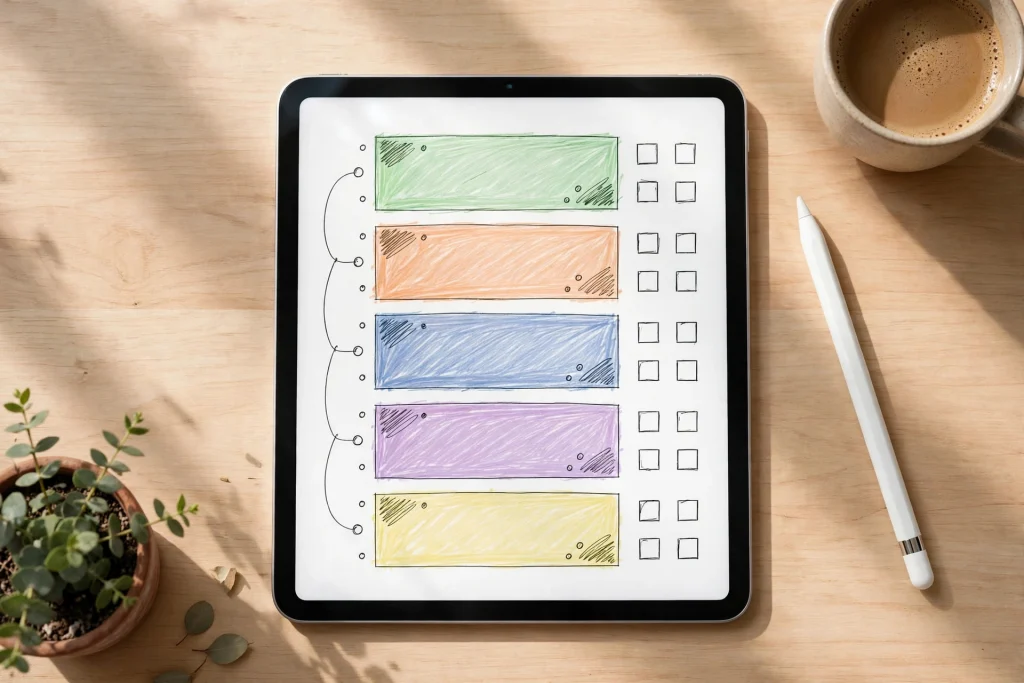
Colour is what turns a list of hours into a picture of your day. But the system only works if you can remember it without a legend. Four colours are enough:
- Blue — deep work: writing, studying, focused project work. The blocks that need your best brain.
- Green — health and life: exercise, meals, walking, sleep preparation.
- Orange — admin and chores: email, errands, housework, calls.
- Purple — people and joy: family time, friends, hobbies, rest.
Use the highlighter tool or a coloured pen at low opacity so the text underneath stays readable. When you glance at the page, the colour balance tells you the truth about your day: a page that is all blue and orange with no green or purple is a day that will end in exhaustion, however productive it looks.
One rule matters more than the palette: never use more than five colours. Every extra colour adds a decision, and decisions are what time blocking is supposed to remove.
Step 3: Plan Tomorrow Tonight (the 10-Minute Evening Routine)
Time blocking fails when you try to plan in the morning, because mornings are already full of decisions. The system works when the plan is waiting for you. Build this ten-minute evening routine:
- Review today (2 minutes): look at what actually happened. Which blocks ran over? Which never started? Do not judge — just notice.
- Write tomorrow’s Top 3 (2 minutes): pick the three outcomes that matter most. Everything else is negotiable.
- Place the fixed blocks first (3 minutes): meetings, classes, appointments, and deadlines go in first. They are non-negotiable, so they get the page before anything else.
- Block deep work around your energy (2 minutes): put your hardest task in your best hours. For most people that is the first two hours after starting work — not the afternoon slump.
- Leave white space (1 minute): deliberately leave at least two empty 30-minute gaps. These are your shock absorbers. A day with no gaps is a plan that breaks at the first surprise.
That last step is the one beginners skip, and it is the reason most time-blocking attempts collapse by Wednesday. A schedule with no slack is not a plan; it is a wish. Leave the gaps.
Step 4: Run the Day — How to Actually Follow Your Blocks
A plan is only useful if you follow it, and following it is a skill, not a personality trait. Three habits make the difference.
Start the block, not the task
When a block begins, start even if you are not ready. Open the document. Write one sentence. The hardest part of deep work is the first ninety seconds; the block gives you permission to begin badly. Perfectionism is the enemy here — a block started imperfectly beats a block postponed until conditions are ideal.
Use a timer for transitions
Set a five-minute timer before each block ends. When it rings, finish the sentence you are on, write a one-line note about where you stopped, and move on. That note is gold: tomorrow you will pick up exactly where you left off instead of spending ten minutes re-reading your own work.
When a block breaks, re-block — don’t abandon the day
A meeting overruns. A child gets sick. The internet dies. The correct response is not to throw the plan away; it is to spend sixty seconds re-blocking the rest of the day. Cross out what no longer fits, drag the Top 3 into the remaining hours, and keep going. People who re-block finish their Top 3 far more often than people who treat one disruption as a ruined day.
GoodNotes Time Blocking for Different Lives
The system flexes to fit the life, not the other way round.
For students
Block study in 50-minute chunks with 10-minute breaks — the rhythm that matches most lecture attention spans. Put revision the day before a deadline, not the morning of it, and keep one evening block a week for “catch-up” so a bad Tuesday does not cascade into a bad week. A 12-Tab Digital Notebook for GoodNotes pairs well with a time-blocked day: lectures in the notebook, the day itself in the planner.
For freelancers and remote workers
Separate client work from business work with colour, and block “invisible” work — invoicing, marketing, learning — or it will never happen. End the day with a hard stop block: a 30-minute shutdown ritual where you review tomorrow and close the laptop. Without a stop block, freelance days expand until they fill the evening.
For parents
Block in larger chunks and accept that children are the shock absorbers. A realistic parent day might have only three real work blocks, and that is fine — the system still works, because those three blocks are protected. Put the family’s fixed points (school run, meals, bedtime) in first, then fit work around them rather than the other way round.
5 Problems That Make People Quit (and the Fixes)
1. “I over-schedule and feel guilty by noon”
You are planning for a perfect day. Plan for a normal one instead: schedule about 70% of your hours and leave the rest open. If you finish early, the empty blocks become bonus time — a far better feeling than a red list of failures.
2. “My blocks are too vague to start”
“Work on project” is not a block; it is a wish. “Draft the introduction, 500 words” is a block. If you cannot picture the first action, the block is too big — split it until the first step is obvious.
3. “I forget to look at the plan”
Put your planner where your eyes already go. On iPad, keep GoodNotes open on your desk setup, or set a morning reminder to open it. A plan you never see is decoration, not a system.
4. “Everything takes longer than I block”
Then your estimates are wrong, not your discipline. For one week, write the actual time each task took next to the planned time. Most people discover their estimates are off by a consistent factor — often 1.5x — and once you know your factor, planning becomes accurate.
5. “It feels rigid and joyless”
Then you have blocked too much and protected too little. Add a purple block every day that is purely for joy — a walk, a chapter, a call with a friend — and treat it as seriously as a meeting. Time blocking is not about squeezing more work into a day; it is about making sure the day contains a life.
Weekly Review: The 20 Minutes That Keep Your GoodNotes Time Blocking Alive
Once a week — Sunday evening works for most people — sit down with the week’s pages and ask four questions:
- Which blocks did I protect, and which kept collapsing?
- What kept taking longer than planned?
- What did I keep postponing, and does it still matter?
- What does next week actually need?
Write the answers on one page. Over a month, patterns appear: the Tuesday meeting that always overruns, the admin that always gets pushed to Friday, the morning block that works brilliantly. Adjust the template to match reality, not the other way round. A 2027 Life Planner with weekly spreads makes this review easy, because the whole week sits on one spread and the patterns are visible at a glance.
Frequently Asked Questions
How many hours should I time block each day?
Block the hours you are awake and want to direct — usually 8 to 12 hours — but leave 20–30% of that time deliberately empty. A fully blocked day breaks at the first surprise; a day with gaps absorbs it.
Is time blocking better than a to-do list?
They do different jobs. A to-do list captures what needs doing; time blocking decides when it gets done. Use both: keep the list as your capture inbox, and move items from it into blocks each evening. The list without blocks is a pile of good intentions; blocks without a list lose track of small tasks.
What if my day is unpredictable?
Block the fixed points and leave the rest as flexible “theme blocks” — for example, a 2-hour “admin and errands” block rather than six 20-minute tasks. You still get the benefit of deciding in advance without pretending you can predict the unpredictable.
Can I time block in GoodNotes on iPhone too?
Yes. GoodNotes syncs through iCloud, so the same planner and template are available on iPhone. The smaller screen suits checking and ticking off blocks; the iPad is better for the evening planning session, where you want to see the whole day at once.
How long until time blocking feels natural?
Most people need two to three weeks. The first week feels slow because planning takes conscious effort; by week three, the evening routine takes ten minutes and the day mostly runs itself. If it still feels like a chore after a month, simplify: fewer colours, fewer blocks, bigger gaps.
Start GoodNotes Time Blocking Tonight
GoodNotes time blocking is not a productivity personality test. It is a piece of paper with hours on it and a decision made the night before. Build the template tonight, block tomorrow’s Top 3, and leave two gaps. Tomorrow evening, look at what actually happened and adjust. That loop — plan, run, review, adjust — is the whole system, and it compounds. A month from now you will not remember the day you started; you will just have days that feel like yours again.
Ready to set up your own system? Browse the Minimalist Daily Planner and the 2027 Life Planner — both work beautifully as a home for your time-blocked days.
Temply Studio
Stop chasing your goals with sticky notes and scattered notebooks. Our premium digital planners and Canva templates are designed to help you plan with intention, stay consistent, and actually enjoy the process.


Questions about this guide?
Ask about the planner, share how you use it, or tell us what to cover next. Your email stays private.