

Quick answer: A mom planner in GoodNotes puts the whole family’s week in one place: school dates, activities, appointments, meal plans, and household tasks, all on pages you can carry on your iPad. The setup that works is a weekly family spread, one page per child for school and activities, a meal plan page, and a 10-minute Sunday reset.
Running a household is project management with higher stakes and no days off. School runs, activity schedules, appointments, meal planning, birthday parties, permission slips, and the weekly shop all compete for the same mental space, and most of it arrives as a message, a letter in a school bag, or a remark at the school gate. A mom planner in GoodNotes gives all of it one home, so nothing depends on remembering a crumpled note.
This guide shows how to build a family planner that actually gets used: the pages that matter, how to organise one page per child without doubling the work, a meal-planning routine that saves a weekly shop’s worth of decisions, and a Sunday reset that takes ten minutes. If you are new to planning on the iPad, start with our guide to using a digital planner in GoodNotes.
Why a digital planner works for family life
Paper family calendars fail in a predictable way: they live in one place, usually the kitchen wall, and you are rarely standing in front of them when a date comes in. A digital planner lives on your iPad or phone, so a date from a teacher’s message can go straight into the planner in the moment it arrives.
Digital planning also survives change better. When an activity moves from Tuesday to Thursday, you move one block instead of crossing out a week. When a child drops an activity, you delete a page instead of living with a crossed-out calendar for a term. And because GoodNotes planners are hyperlinked, you can jump from the family week to a child’s page to the meal plan in two taps, which matters when you are planning with one hand and holding a school bag with the other.
The 5 pages every mom planner needs
1. The weekly family spread
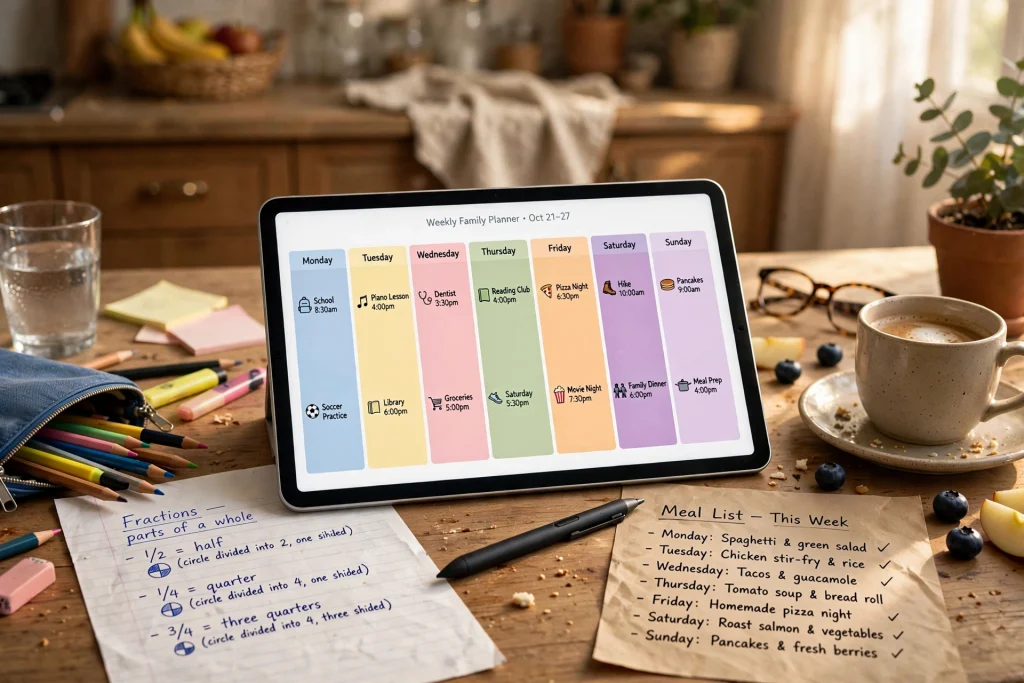
One spread for the whole family, with a column or row per person. This is the page you check every morning. Keep it to appointments, activities, and deadlines only; if it also holds shopping lists and reminders, it becomes too crowded to read at a glance. Colour-code by person so a busy week is readable in seconds.
2. One page per child
Each child gets a page for their school and activity schedule: term dates, club days, kit needed, teacher names, and homework routines. This page is also where permission slips and school trip dates live. One page per child sounds like more work, but it prevents the most common family-planning error: two children, two similar activities, one confused week.
3. Meal plan and shopping list
A weekly meal plan page with seven dinners, plus a shopping list built from it. This single page saves more decisions than any other page in the planner. Plan meals on Sunday, shop from the list, and the nightly “what’s for dinner” negotiation disappears. Keep a short list of ten fallback meals for weeks when planning did not happen, because those weeks will happen.
4. Household tasks and appointments
One page for the running of the house: appointments for the family, car and home maintenance, birthdays and gifts, and recurring tasks like school uniform checks. Reviewing this page in the Sunday reset catches the appointment that would otherwise surface the day before it happens.
5. Monthly overview
One monthly page showing school holidays, birthdays, big events, and deadlines. This is the page for forward planning: booking holiday activities, spotting a clash between two children’s events, or noticing that three birthdays land in the same week. The 2027 Life Planner gives you monthly and weekly spreads in one system, which is exactly the structure a family planner needs.
How to set up your mom planner in GoodNotes
- Start with a hyperlinked weekly planner. Family planning means jumping between pages constantly, so hyperlinked tabs are not a luxury here; they are the feature that makes the planner usable one-handed.
- Duplicate 12 weekly spreads at once. A term’s worth of weeks, ready to go, means you never face a blank week on Monday morning. Add the recurring activities to each week in one sitting.
- Create the per-child pages and link them from the weekly spread. When each child’s name on the weekly spread links to their page, checking kit or teacher details takes one tap.
- Build the meal plan as a reusable template. One clean meal-plan page, duplicated weekly, beats redrawing a table every Sunday. Keep the fallback-meals list on the template itself so it is always there when you need it.
- Add a budget note to the meal page. A rough weekly food budget, noted on the meal plan, turns the shopping list into a spending check. The 2027 Finance Planner pairs well here if you want household budgeting alongside family planning, and the Minimalist Daily Planner works as a clean daily companion page.
The 10-minute Sunday reset
A family planner only works if someone looks at it weekly. The Sunday reset is that look, and it should take ten minutes, not an hour:
- Check next week’s family spread for clashes: two children needing lifts at the same time, or an activity overlapping an appointment.
- Move anything that changed: a rescheduled club, a new school date, a rearranged appointment.
- Plan seven dinners and write the shopping list from the meal plan.
- Check each child’s page for kit, homework, or letters that need attention this week.
- Note one thing to look forward to next week. Family planning can feel like pure logistics; a visible good thing on the page is a small but real morale fix.
Common mom planner mistakes
Putting everything on the weekly spread. The weekly page is for dates and activities. Shopping lists, meal details, and long task lists belong on their own pages, linked from the week, or the week becomes unreadable.
Planning for one child in detail and the others from memory. The child whose page is thinnest is the one whose trip or kit day gets missed. Give every child the same page, even if one child’s week looks quieter.
Skipping the reset for two weeks. A planner that is two weeks out of date is worse than no planner, because it looks reliable while being wrong. If you miss a reset, spend the next one updating dates before planning anything new.
Making the planner too pretty to use. Stickers and decoration are fun, but a family planner earns its place by being fast. If decorating takes longer than planning, simplify the decoration until the planner is a tool first.
Mom planner FAQ
Can my partner see the family planner too?
GoodNotes notebooks can be shared through iCloud or exported as PDFs, so a weekly export to your partner keeps everyone on the same page. Many families keep one shared weekly PDF and one detailed planner on the main organiser’s iPad.
What ages does a mom planner work for?
Any age, but the pages change. For younger children, the planner holds your schedule for them. For older children, their own column on the weekly spread teaches them to check the family week themselves, which is a useful habit before they need their own planner.
Should meal planning live in the same planner?
Yes, as its own page linked from the weekly spread. Keeping meals in the same planner means the shopping list and the family week are planned together, which is when clashes like a late activity night and a slow-cooked dinner get caught early.
How do I start if the family schedule is already chaos?
Start with one week only: next week’s family spread and one page per child, filled from messages and school letters. Do not try to backfill a term. One accurate week beats a beautifully decorated empty planner, and the Sunday reset builds the rest over time.
Family life will always be busy, but it does not have to be chaotic. One weekly spread, one page per child, a meal plan, and a ten-minute Sunday reset turn a scattered set of dates into a week you can actually see. Browse the 2027 Life Planner and the rest of the shop to find a planner base for your family, and start with next week’s spread today.
For the official GoodNotes app, see GoodNotes.
Temply Studio
Stop chasing your goals with sticky notes and scattered notebooks. Our premium digital planners and Canva templates are designed to help you plan with intention, stay consistent, and actually enjoy the process.

Questions about this guide?
Ask about the planner, share how you use it, or tell us what to cover next. Your email stays private.