




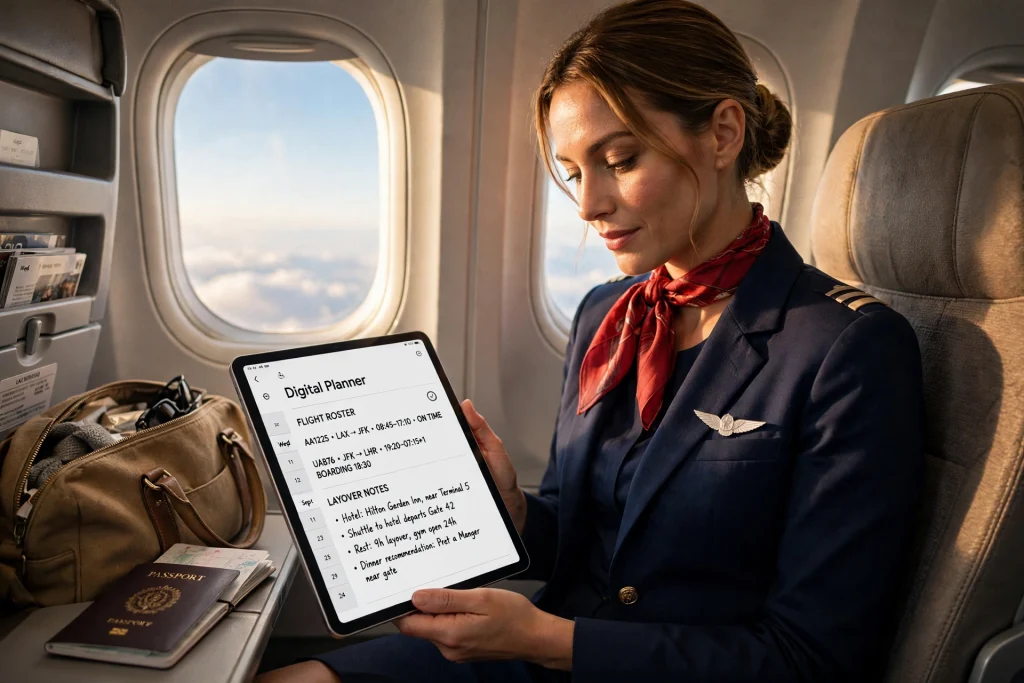
Quick answer: GoodNotes for flight attendants is a way of running your whole flying life from one iPad notebook: your monthly roster, standby days, layover plans, packing lists, hotel and per-diem notes, crew contacts and travel logs, all in a hyperlinked digital planner that works offline in the air. Once your pages are synced, you can read and write everything at 35,000 feet.
Life as cabin crew runs on a schedule most people never see. One month you are crossing three time zones in a week; the next you are on standby, waiting for a call that could send you anywhere. Paper rosters get folded, lost and rewritten. Notes about a good hotel end up in a different app from your packing list, and the crew member who recommended a layover restaurant disappears into a chat thread you will never find again. GoodNotes for flight attendants solves that scattered feeling by giving you one place where the whole job lives.
This guide shows you how to build a crew notebook in GoodNotes 6 covering rosters, standby, layovers, packing, expenses, rest and self-care. You do not need to be a digital planning expert. A single well-organised notebook and a habit of writing things down in the same place will carry you through a full flying month.
Why GoodNotes for Flight Attendants Works So Well
The reason GoodNotes suits cabin crew is simple: it behaves like paper, but it never runs out of pages and never gets left in a hotel room. You can handwrite your roster notes, circle a flight number, scribble a gate change, and search your own handwriting later. When a purser asks who volunteered for a swap last month, you can search instead of flipping through printed rosters.
The second reason is offline access. Once your notebooks are synced through iCloud, GoodNotes works fully offline. That matters in airplane mode over the Atlantic, in a hotel with slow Wi-Fi, or in a crew room where the signal barely reaches. Your roster, layover sheet and packing list are on the device in your bag, not stuck behind a loading screen.
Third, everything stays in one system. Your monthly calendar, layover city guides, uniform checklist and travel log can all live inside one notebook with hyperlinked tabs, or across a small set of folders. Folders keep your crew notebook separate from your personal planner, so work stays work and home stays home.
How to Set Up Your Crew Notebook in 6 Steps
You can set this up in one sitting at home, ideally before your next roster drops.
- Create one notebook called “Crew Kit” with a cover you will recognise. Pick a distinct colour or a photo of a window view so you can find it fast in the library.
- Add a hyperlinked monthly planner as the first section. Linked tabs let you jump from your roster overview to a specific week in one tap. The 2027 Life Planner gives you dated monthly and weekly pages that work well as the backbone of a crew notebook.
- Build a “Roster” section with one page per month. Import your roster as a PDF and annotate it, or copy the key flights onto a calendar page by hand.
- Add a “Layovers” section with one page per city. Start with the five cities you visit most: hotel details, transport, food, things to do, and a notes box for crew tips.
- Add a “Packing” section with one reusable checklist page. Split it into cabin bag, suitcase, uniform and toiletries, then save the finished list as an Element.
- Add a “Log” section for travel notes, expenses and rest. One page per trip: date, route, crew names, a line about the layover, and expenses to claim. Over a year this becomes a travel journal you will enjoy rereading, and our guide to a GoodNotes travel journal shows how to turn those pages into a keepsake.
Monthly Rosters and Standby Planning
Your roster is the document your whole month hangs on. Most crew get it as a PDF or through a crew app, and the first job in GoodNotes is to get that information somewhere you can work with it. Import the roster PDF straight into your notebook and annotate it: highlight early starts, circle long-haul pairings, star the layovers you are looking forward to, and cross out anything that changes. GoodNotes lets you search your handwriting, so even a scribbled note like “swap with Ana?” stays findable weeks later.
Reading Your Roster at a Glance
Colour is your best friend on a roster page. Pick a simple code and stick to it all year: one colour for long-haul, one for short-haul turns, one for standby, one for days off. When you open the month view, the pattern of your month should be visible in two seconds.
Standby Days Without the Stress
Standby is the part of the job that most often gets messy in paper planning, because the day can change at any moment. Give standby its own page. Write the standby window, the earliest you could be called, and what you need ready: uniform pressed, bag packed, passport and ID in the same pocket every time.
Keep a small standby checklist on that page: phone charged, crew bag by the door, uniform ready, water bottle filled, a snack packed. When the call comes, you run the list instead of thinking. Also keep a “called / not called” line for each standby day, so you can see exactly how your standby was used.
Layover Planning That Actually Helps You Enjoy the City
A layover can be the best part of the job or a wasted 24 hours in a hotel room, and the difference is usually preparation. A good layover sheet turns a strange city into a short, doable plan you can follow while you are still half asleep from the flight. Keep each city to a single page, with the same layout every time. After three or four trips to the same destination, your sheet becomes genuinely useful: you know which restaurant is open late and which metro line goes to the hotel.
A One-Page Layover Sheet
Use this layout for every city and you will never stare at a blank page wondering what to write:
- Hotel: name, address, check-in time, Wi-Fi password, and the nearest shop or pharmacy.
- Transport: how to get from the airport to the hotel, the metro or bus line, and the rough cost in local currency.
- Food: two or three places crew recommend, including one open late after a delayed arrival.
- Do: one walk, one sight and one quiet spot, each with a rough time.
- Crew tips: anything another crew member told you, with their name so you can thank them or ask a follow-up.
- Buy: the things worth bringing home from this city, from skincare to snacks to gifts.
Fill in the hotel and transport details before you fly. Add the food and tips after you land, while they are fresh. A sheet that grows a little on every visit is far more valuable than a perfect sheet you never update.
Building Your Layover City Guides
Over time your single pages add up to a personal guidebook no app can match, because it is written for your exact situation: short stays, odd hours, crew hotels and tired legs. Keep the cities you fly to most often at the front of the Layovers section, and move the rare ones to the back. Photos help too: snap the hotel entrance, the metro map and the menu of the good restaurant, and drop them onto the city page. A photo of a street corner beats a paragraph of directions when you are finding your way back at midnight.
Packing Lists That Never Let You Forget the Charger
Every crew member has a story about the forgotten item: the charger left at home, the second pair of tights, the adapter for the one country that uses a different plug. A packing list in GoodNotes fixes this, because the list is the same every time and you tick it off with the Apple Pencil instead of relying on memory at 3 a.m.
Build one master list and split it into sections: cabin bag, suitcase, uniform, toiletries, documents, and “nice to have”. Under documents, put passport, crew ID, licence or attestation, and any visas you need for the month. Under uniform, list every piece.
Keep a separate short list for the aircraft itself: water bottle, snacks, hand cream, lip balm and a pen that works. Save the finished list as an Element. Before each trip, stamp it onto a fresh page and tick items off as you pack. If you forgot something, add it in bold; if you packed something you never used, cross it off the master list.
Time Zones, Rest and Self-Care
Jet lag is not a minor inconvenience for cabin crew; it is the background condition of the job. A GoodNotes page that tracks your sleep across a roster shows you patterns you cannot feel in the moment. You might notice you sleep badly after eastbound long-haul but recover fast after westbound, or that three short-haul early starts in a row leave you more tired than a single long-haul.
Time-Zone Planning
For every long-haul pairing, write down three times on your roster page: home time, destination time, and the time difference. It sounds basic, but writing it out stops the mental arithmetic at the hotel when you are working out whether it is a reasonable hour to call home. On multi-sector trips, keep a small time-zone table on the trip page: each city, its offset from home, and the local time when you land.
Rest and Self-Care Tracking
Give yourself a simple rest log at the back of the notebook. One line per day: hours slept, how you felt on waking, and one note about what helped or hurt. A line like “slept 5 hours, blackout blinds helped” is more useful than a detailed sleep diary you will abandon after a week.
Self-care on layovers deserves a page too. List the small things that help you reset: a walk, a swim in the hotel pool, a proper meal, a call home, or simply an afternoon with no plans. Planning rest around a flying schedule is also a time problem, and our guide to GoodNotes time blocking shows how to protect sleep, meals and recovery time on a calendar page.
Hotel, Per-Diem and Expense Notes
Expenses are the least glamorous part of the job and the easiest to get wrong. Receipts pile up in a jacket pocket, per-diem rules vary by destination, and by the end of the month nobody remembers what was spent where. A GoodNotes expense page per trip solves most of this in about two minutes a day.
Set up a simple table on each trip page: date, what you bought, the amount in local currency, and the amount in your home currency. Snap a photo of each receipt and paste it next to the line, or keep the paper receipt and just note the number. Keep a separate per-diem note at the front of the expenses section with the rate for each destination you fly to regularly, and date your updates, since rates change.
Crew Contacts, Language Phrases and Incident Notes
Cabin crew work is deeply social. You fly with different people every week, and the crew member who is a stranger on Monday can be the person who shows you the best restaurant in Bangkok by Friday. A contacts page keeps those connections alive. Note names, the routes you flew together, and one line about the person. When you see their name on a roster six months later, you will remember who they are.
Language phrases deserve their own page too. You do not need to be fluent; a dozen phrases per destination covers most situations. Greetings, thank you, please, the numbers one to ten, and the phrases you actually use on board: “Would you like tea or coffee?”, “Please fasten your seatbelt”, “We will be landing shortly”. Write them phonetically so you can read them aloud without hesitation.
Incident and report notes are the serious side of the notebook. If something unusual happens on a flight, write it down as soon as you can: flight number, date and time, who was involved, and what happened, in plain factual language. GoodNotes is useful here because your note is kept with the rest of the trip record. These notes are a personal record, not a substitute for your airline’s official reporting process.
Uniform and Grooming Checklists
Uniform standards are part of the job, and a checklist in GoodNotes takes the morning stress out of them. Build one page with the full uniform as a visual list: jacket, skirt or trousers, shirt, tie or scarf, shoes, tights, epaulettes, wings, name badge, and any seasonal items. Tick each piece off before you leave home.
Grooming deserves the same treatment. A small checklist for hair, makeup and nails, matched to your airline’s standards, keeps your preparation consistent on early starts when you are barely awake. Add a “night before” box for anything that can be done in advance, like pressing the uniform, because preparation the night before is what makes a 4 a.m. report time bearable.
Using GoodNotes Offline in the Air
One of the biggest practical advantages of GoodNotes for flight attendants is that your whole notebook works without a connection. Before you fly, open the notebook once while you have Wi-Fi so iCloud sync finishes, and everything is stored on your iPad. After that, you can read your roster, write in your travel log and tick off your packing list at cruising altitude with the device in airplane mode.
Use the flight itself as planning time. The hours between services are a good moment to fill in tomorrow’s layover sheet or write up the trip log. When you land and reconnect, iCloud syncs your changes to your other devices automatically.
Frequently Asked Questions
Is GoodNotes good for flight attendants?
Yes. GoodNotes for flight attendants combines handwriting, searchable notes, hyperlinked planners and offline access in one app. You can keep your roster, layover guides, packing lists, expenses and travel log in a single notebook that works in airplane mode and syncs through iCloud when you are back online.
Can I use GoodNotes offline on the plane?
Yes. Once your notebooks have synced through iCloud, GoodNotes works fully offline. Open the notebook once before departure while you have Wi-Fi, and you can read, write, annotate PDFs and tick off checklists for the whole flight.
How do I organise a GoodNotes notebook for cabin crew?
Use one notebook with sections for Roster, Layovers, Packing, Expenses and Log. Add a hyperlinked monthly planner at the front, one layover page per city, a reusable packing checklist saved as an Element, and a trip log page per pairing.
Can I import my roster PDF into GoodNotes?
Yes. You can import a roster PDF directly into GoodNotes and annotate it with highlights, handwriting and the lasso tool. Many crew also copy the key flights onto a calendar page by hand, which helps them learn the month.
What is the best GoodNotes planner for a flight attendant?
The best planner is a dated monthly and weekly planner with hyperlinked tabs, because it lets you jump from a roster overview to a single trip day in one tap. A minimalist daily planner works well if you prefer clean daily pages with room for handwritten notes.
Start Your Crew Kit This Week
You do not need a perfect system to start. Open GoodNotes, create one notebook, add a monthly planner, and write in your next roster by hand. Add one layover page for the city you visit most, and one packing list you will reuse on every trip. That is enough to feel the difference on your very next pairing. If you want a ready-made planner to build your crew kit around, the 2027 Life Planner gives you dated monthly and weekly pages, hyperlinked tabs and plenty of room for handwritten roster notes, layover plans and travel logs, all in one notebook that works offline in the air.
Temply Studio
Stop chasing your goals with sticky notes and scattered notebooks. Our premium digital planners and Canva templates are designed to help you plan with intention, stay consistent, and actually enjoy the process.



Questions about this guide?
Ask about the planner, share how you use it, or tell us what to cover next. Your email stays private.