




A GoodNotes habit tracker works best when it is boring — the same page, the same few habits, checked off at the same time every day. Most habit trackers fail not because the habit is hard, but because the tracker is. Too many habits, a complicated layout, and a page you have to hunt for will kill a streak faster than a missed day. This guide shows you how to build a tracker you will actually open, starting with one habit and growing only when the habit is solid.
Quick answer: Pick one habit, give it a single daily tick box on a page inside your existing planner, check it at a fixed moment — usually with your morning coffee or evening review — and review the week every Sunday. Add a second habit only after two unbroken weeks. Simple trackers survive; ambitious ones do not.
Why a GoodNotes Habit Tracker Beats a Separate App
A dedicated habit app sends reminders, but it lives somewhere you have to remember to open. Your planner is already open — that is the whole point of a 2027 Life Planner or a daily planner you use every morning. Putting your tracker inside it means checking a habit takes one tap, not a detour into another app.
GoodNotes also lets you design the tracker around your life rather than a template’s assumptions. A shift worker, a student and a parent do not have the same days, and a paper-style grid with a tick per day is flexible enough for all three. You can add notes next to a tick — “walked at lunch, not morning” — which most habit apps make awkward. That context is what turns a streak into learning about yourself.
Step 1: Pick One Habit, Not Ten
Start with exactly one habit, and make it specific. “Exercise more” is not a habit; “walk 20 minutes after lunch” is. “Read more” is not a habit; “read 10 pages before bed” is. Specificity matters because a tick box needs a yes-or-no answer at the end of the day. If you have to debate whether you did it, the habit is too vague.
Choose a habit you can do on a bad day, not just a good one. Ten pages on a tired evening is doable; fifty is not. A tracker that survives bad weeks is worth more than one that looks impressive for six days and then collapses. Once the first habit has survived two full weeks, you have earned the right to add a second.
Step 2: Design a Page You Can Fill In 30 Seconds
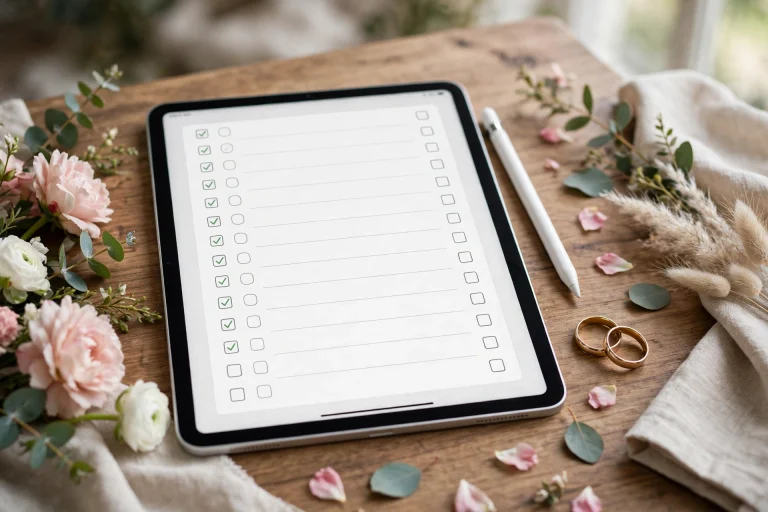
Your tracker page should take less than thirty seconds to complete. A simple layout works: habits down the left side, days of the week across the top, and a box for each day. Use the pen or a sticker to mark a completed day, and leave missed days blank rather than crossing them out angrily — a blank box is information, not failure.
If you prefer a daily page over a weekly grid, add a small habit section to your daily spread: three tick boxes under a heading such as “Today’s habits”. This suits people whose planner is already their home base, and it keeps habits visible alongside appointments rather than hidden in a separate section. Either layout works; the test is whether you fill it in without thinking.
Keep the page inside your main planner, not in a separate notebook. Every extra document you have to open is friction, and friction is what kills habits. If your planner has a notes section, that is a natural home — see our guide to using a digital planner in GoodNotes for how to structure those sections.
Step 3: Anchor Checking to Something You Already Do
A habit tracker only works if checking it becomes part of an existing routine. Anchor it to a moment that already happens every day: your morning coffee, your evening planner review, or the moment you close your laptop. Write the anchor on the tracker page itself for the first two weeks — “Check with evening review” — until it becomes automatic.
Do not anchor checking to the habit itself. If you only check the tracker when you exercise, a missed workout also means a missed check, and you lose track of the miss. Checking is its own habit, separate from the habits it tracks, and it deserves its own anchor.
Step 4: Review Weekly, Not Daily
Daily tracking is for ticking boxes; weekly review is for learning. Every Sunday, spend five minutes looking at the week: which days worked, which did not, and what got in the way? A pattern usually appears quickly — a habit that fails every Thursday probably has a scheduling problem, not a willpower problem.
Use the review to adjust the habit, not to scold yourself. If evening reading fails because you fall asleep, move it to lunch. If a morning walk fails on rainy days, add an indoor alternative. A tracker that helps you redesign habits is useful; one that only counts failures is a guilt machine, and guilt machines get abandoned.
What to Do When You Break a Streak
You will break a streak. Everyone does. The rule that saves most trackers is simple: never miss twice. One missed day is life; two missed days is the start of a new pattern. After a miss, the next day’s job is only to tick the box again — not to make up for yesterday, not to do double, just to restart.
It also helps to decide in advance what counts as “done” on a hard day. A two-minute version of the habit — one page instead of ten, a walk around the block instead of a full route — keeps the streak alive honestly. Purists may object, but a tracker that survives real life beats a perfect record that ends at the first holiday.
How Many Habits Is Too Many?
Three to five habits is a practical ceiling for most people, and even that takes time to build up to. Start with one, add a second after two good weeks, and stop adding when checking the tracker starts to feel like a chore. If you have ten habits and check none of them, you do not have a tracker — you have a wish list.
Seasonal habits deserve their own note. A habit for a busy term, a training block or a holiday period can live on a separate monthly page, so it does not clutter your everyday tracker when the season ends. Archive old tracker pages rather than deleting them; looking back at a completed month is genuinely motivating, and it shows how far a small daily habit can compound.
Pairing Your Tracker With the Rest of Your Planner
Habits do not live alone. A workout habit pairs with a Minimalist Daily Planner page where you note how you felt afterwards. A reading habit pairs with a reading list. A savings habit pairs with a budget page. These links are the reason a planner-based tracker beats a standalone app: the habit, the plan and the reflection sit together, and each makes the others easier.
If your planner feels crowded, resist the urge to rebuild it. Add the tracker to one page, use it for a month, and only then decide whether it needs its own section. Small, proven changes stick; grand redesigns usually last a week.
FAQ
How do I make a habit tracker in GoodNotes?
Add a page to your existing planner with habits down one side and days across the top, then tick each day you complete the habit. Keep it to one habit at first, and check it at the same time every day.
How many habits should a GoodNotes habit tracker have?
Start with one, build to three to five over time, and stop adding when checking feels like a chore. A tracker you actually use beats an ambitious one you abandon.
What should I do if I miss a day on my habit tracker?
Leave the box blank and restart the next day — never miss twice. A small “minimum version” of the habit on hard days keeps the streak alive without demanding a perfect day.
Should my habit tracker be separate from my planner?
No — keep it inside the planner you already open daily. A separate notebook adds friction, and friction is the most common reason trackers get abandoned.
Start tonight: pick one habit, add one tick box to tomorrow’s planner page, and check it with your evening review. To build from a solid base, browse the 2027 Life Planner and make tomorrow the first tick.
Temply Studio
Stop chasing your goals with sticky notes and scattered notebooks. Our premium digital planners and Canva templates are designed to help you plan with intention, stay consistent, and actually enjoy the process.

Questions about this guide?
Ask about the planner, share how you use it, or tell us what to cover next. Your email stays private.